Sunday, 13 October 2013

Troubleshooting steps when Eclipse ADT does not recognize your Android device.

Device also does not show up in adb. Try adb devices . It will not show up unless you have enabled USB debugging and installed the right driver.

If you have not even enabled Developer option you may want to do it now

How to enable developers option in your android device?

Before going to the troubleshooting steps make sure following basic checks are passed.

  1. Make sure you have installed Google USB driver. If not you do it from Android SDK manager.

  2. Next make sure you have enabled USB Debugging on your android device. You will find this option in System Settings -> Developer Options -> USB Debugging.
  3. Make sure your device it compatible with the minimum API level you have set on your android project.

Debugging Steps

You need to install proper driver of your device. Only then your Eclipse can detect your device to launch you application on it.

 1. Go to Computer(right click) -> Manage ->  Device Manager.
 2. If your device is categorized in "other devices" or "portable" devices" something is not right. Double click on the device listed in Device manager. Inside it check your driver details.
 3. If there are no driver details shown or the button is not clickable then the driver is not installed. If it is you need to update it.
 4. Windows should automatically do this for you. If not you can click on the icon when it is searching for the device driver and select "install most suitable driver automatically". [You will have to enable automatic update for this]
 5. Either case mentioned in point 3 the end result should be that after installing your driver(mind any suitable driver if your device driver is not available). Your device should be listed under the category "Android USB Devices"
 6. Now you can be sure that ADT would detect your device.

PS : I have mentioned any suitable driver because in my case I had Micromax A69(ICS) and it installed HTC driver. After this Android ADT started detecting my device.

 I am using Windows 7. Attaching a screen shot just for the reference - 


PS : You may also have to manually download and install driver if not found automatically. So when you click update select from local directory.
 

Samsung/ SAFE devices


For example when I tried this with samsung Galaxy S5 driver was not automatically installed. So I downloaded it manually from their site and installed it.
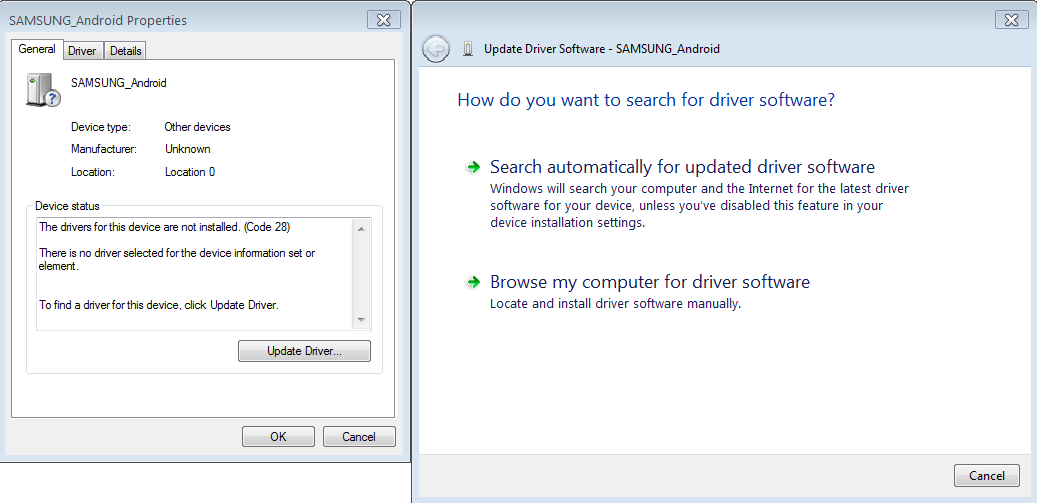


Use Browse my computer option.For samsung driver from above link you will get exe file that will install driver for you.

Moto G/E


Recent I bought Mote E and had the same problem. Again you need to manually download the suitable driver and install.

Remove the img extension and install.

Relate Links


    Friday, 11 October 2013

    Overriding Methods in Java - How it works?

    Background


    Method overloading and method overriding are two important concepts in Java. It is very crucial to know the way they are work and the way they are used.

    The main motive of this post is to understand Method overriding and it's usage. Lets quickly understand what both terms mean and move on to the overriding part for details.


    Method Overloading

    Method or Function overloading means two or more functions with same name but different number and type of arguments(Signature). The purpose of this is to provide common functionality but in different possible scenarios. Example -

    public void setEmployeeInfo(String name);
    public void setEmployeeInfo(String name, int age);
    public void  setEmployeeInfo(String name, int age, String id);


    Name of the function remains the same but the number and type of arguments changes.

    Note : return type has noting to do with overloading. In fact return type of a method is not a part of it's signature. Only the function name and the arguments form a part of method signature. Also as we know that two methods with same signature are not allowed following scenario is not allowed -

    public String getEmployee(String name);
    public Employee getEmployee(String name);


    Note :  Also keep in mind method overloading is a compile time phenomenon. Which if the overloaded method is to be executed is decided at compile time based the method signature.

    Method overloading has some resolution rules that decides which method to pick up at compile time. Compilation will fail if no methods are matched. For example consider following methods -

    • public void getData(String dataName)
    • public void getData(Object dataName)
    Now what happens when you call getData("employeeName"). The one with String argument will be chosen because it is more specific. Anyway that was just a simple example. Things can be more complicated. Refer to following post to see the rules java applies for this resolution -

    Method Overriding

    Method overriding comes into picture only when there is inheritance involved. If there is a method in a super class then a sub class can override it. Let us first see an example and then dive into various aspects of it.
    Lets say we have a Animal class in a package called worldEnteties. It has  a move method as follows.

    package worldEnteties;


    public class Animal {
        
        public void move() {
            System.out.println("Animal is moving");
        }
    }
    

    Also we have a Dog class which extends this Animal class. In this Dog class we override the move() method to do some different movement(Dog specific).

    package worldEnteties;

    public class Dog extends Animal {
       
        @Override
        public void move(){
            System.out.println("Dog is moving");        
        }
    }
    

    Now when you create a normal Animal object and call move() on it, it will simply execute the function in Animal class.

    Code : 

        public static void main(String args[]) {       
            Animal animal = new Animal();
            animal.move();
        }
    

    Output :
    Animal is moving

    Now when we create a Dog object and call move() on it, it will execute the corresponding move() function.

    Code : 

        public static void main(String args[]) {      
            Dog dog = new Dog();
            dog.move();
        }
    
    Output :
    Dog is moving

     Now the question may arise -
    Q ) What if I wast to invoke move() in Animal when move() in Dog is invoked? After all Dog is an Animal. 

    Ans ) The answer is you can call super.move() inside the overridden function to call corresponding function in the superclass. Yes it happens by default in constructors but in normal functions you have to explicitly invoke super.functionName() call. A sample code would be as follows - 

    Modify the overridden move() method in Dog class as follows

     package worldEnteties;
    
    public class Dog extends Animal {
        
        @Override
        public void move(){
            super.move();
            System.out.println("Dog is moving");        
        }
    }
    

    Now execute the following code and examine the results -

    Code :

        public static void main(String args[]) {        
            Dog dog = new Dog();
            dog.move();
        }
    
    Output :
    Animal is moving
    Dog is moving
     

    Method Overriding is a runtime phenomenon!!!!

      So far so good!! Now lets involve polymorphism in it and lets see what makes method overriding a runtime phenomenon.[Always remember polymorphism as superclass reference to subclass object] Consider the following code(No super call just plain simple inheritance and explained in the 1st case above) - 
    code :
        public static void main(String args[]) {        
            Animal dog = new Dog();
            dog.move();
        } 
    

    Output:
    Dog is moving

    How it works?

    At compile time all that java compiler knows is the reference type Animal in our case. All compiler does is check whether move() method is present(or at-least declared) in the Animal class(If not compilation error will occur). As in our case it is present and code compiles fine. Now When we run the code, it is at this time the JVM will know the runtime class of the object [You can also print it using dog.getClass()] which is class Dog in our case. Now JVM will execute the function in Dog and we get our output.

    Code Snap :


    Another important point to note is that the access modifier of the overriding function can be liberal! Meaning if access modifier of super class is private than modifier of overriding method is subclass can be default(no modifier), protected or public. It cannot be the other way around(overriding method cannot have more strict access modifier).

    Note : Access to static/instance fields and static methods depend on class of the polymorphic reference variable and not the actual object to which reference point to. Also variables are never overridden. They are shadowed.

    So if you have

    public class A {
        public static String test = "testA";
        public static void test() {
            System.out.println(test);
        }
    }


    and

    public class B extends A {
        public static String test = "testB";
        public static void test() {
            System.out.println(test);
        }
    }


    and you run

    public class Test {
        public static void main(String args[]) {
            A a  = new B();
            a.test();
        }
    }


    it will print testA

    Note : In method overridden return type can be same or subclass of the super class method. Same goes for Exception thrown. Exception thrown by the overridden method can be same or subclass of Exception thrown by method in the super class. However the access modifies for the overridden method should be more strict. (See Rules below)

    Rules for method overriding


    For overriding, the overridden method has a few rules:
    1. The access modifier must be the same or more accessible.
    2. The return type must be the same or a more restrictive type, also known as covariant return types.
    3. If any checked exceptions are thrown, only the same exceptions or subclasses of those
      exceptions are allowed to be thrown.
    4. The methods must not be static. (If they are, the method is hidden and not
      overridden.)

    Related Links


    Thursday, 22 August 2013

    Understanding Exceptions and Errors

    This post will cover very basic meaning and understanding of Exception and Error in java.

    What is Exception?

    Sometimes the program(code) we write does not behave the way we intent to. Java is designed to be simple. Hence Java developers provided exception handling from the very beginning. By Exception handling it is made sure that all the possible cases in your code which may led to unexpected behavior are handles.

    How is Exception different from Error?

    Exception as I mentioned previously is  unexpected behavior of your code. This statement is also applicable to Error but the difference being we can recover from Exception but we cannot recover from an Error. Error is fatal and will directly terminate your program and on the other hand Exceptions are situations that can be taken care of . They can be handled so that program can carry on it's execution.

     Example

       Consider a program in which you read some data from user store it in an array and then when user is finished entering data you write this data in a file. Now we know that when we have to write some data in a file it is very much possible that the files may not be present. This results in an Exception. But note that this situation is recoverable. We can specify a construct(we will get to it's syntax and technical aspect a bit later) that will help us catch this type of situation and figure out a way out of it. Possible way out would be inform user that the file is not present and ask him to provide a path for the same.

    How decides whether some Exception can occur in curtain situation? Can we create our own custom Exception?

    Java is an Object oriented programming language. There are objects and they have methods that are used to interact with other objects.  Exception and Error are also objects. We know Exceptions can occur while executing a particular method. So when we declare this method which we know can throw a known exception we simply state(in the methods signature) that whoever uses this method must handle the corresponding Exception. In fact in java your code will not compile unless you handle all the exceptions associated with the methods in the code you are compiling. So as far as our first question in concerned developers who write(code) a method also indicate the corresponding exceptions in the methods signature. Yes! we can create our own custom Exception. We can create our own function/methods that throw these Exception. Of course there are rules as of how can you achieve this in Java but none the less it can be very much done. 

    Exception and Error Structure in Java

    This is just to give a structural overview of Exception and Error in java. We will get to it's technicality is future posts.


    Monday, 17 June 2013

    Understanding differences between dpkg and apt-get/aptitude tools.

    dpkg only installs a package, so doing dpkg -i packageName.deb will only install this Deb package, and will notify you of any dependencies that need to be installed, but it will not install them, and it will not configure the packageName.deb because well...the dependencies are not there.

    apt-get is a Package Management System that handles the installation of Deb packages on Debian-based Linux distributions. A Package Management System is a set of tools that will help you install, remove, and change packages easily. So apt-get is like a clever dpkg.


    I like to think of the timeline this way:
    • They came up with a way to "store" the files of an application in a "package" so that it can be installed easily. So the Deb package (.deb extension file) was born.
    • They needed a tool to install these .deb files, so they came up with the dpkg tool. This tool, however, will just install the .deb file, but will not install its dependencies because it doesn't have those files and it does not have access to "repositories" to go pull the dependencies from.
    • Then, they came up with apt-get, which automates the problems in the previous point. Underneath the hood, apt-get is basically dpkg (so apt-get is a front-end for dpkg), but a clever one that will look for the dependencies and install them. It even looks at the currently installed dependencies and determines ones that are not being used by any other packages, and will inform you that you can remove them.
    aptitude then came along, and it's nothing but a front-end for apt-get [so, it's a front-end of a front-end]. aptitude is a UI (user interface) for apt-get. If you want to see this UI, simply type aptitude in the terminal; that's aptitude, that's what it was originally created for. aptitude leverages the apt tools to provide more options and perks than apt-get. For example, aptitude will automatically remove eligible packages, while apt-get needs a separate command to do so. But, in the end, doing sudo aptitude install packageName.deb is the same as sudo apt-get install packageName.deb. There might be subtle differences here and there that I do not know about, but they will both look for the dependencies and do all that stuff.
    Also, aptitude does not have Super Cow Powers.

    How do I install already downloaded packages in Ubuntu?


    You may wish to install a package you have downloaded from a website, rather than from a software repository. These packages are called .deb files. Because they may have been created for a different Linux distribution, you might find that there's dependency issues with Ubuntu, meaning that they may be uninstallable. 

    To find a package which you have previously downloaded using Synaptic, aptitude or apt-get, look in /var/cache/apt/archives 

    You can then install the package using apt-get or aptitude.  You can also use dpkg.

    Simply type the following command to install a package using dpkg.
    dpkg -i <packageName>

    Note :  Though dpkg will resolve the dependencies and show you if they are not met, it will not automatically fetch and install them from repositories. In fact apt-get internally calls dpkg to install packages after resolving and downloading dependent packages.
    t> UA-39527780-1 back to top