Saturday, 12 September 2015

Find the row with maximum number of 1s

Background

This is a data structure and an interview question. It goes as follows - 

"Given a boolean 2D array, where each row is sorted. Find the row with the maximum number of 1s."

or to put it another way each row will have either all 0's or all 1's or k 0's and (n-l) 1's given a 2D array of m*n. Also each k 0's are contiguous and same goes with (n-1) 1's. In short they are sorted. This is just to confuse the interviewee and do not give straight hint that we are dealing with sorted things here :)

Example is in screenshot below-


Note : This question is also in GeeksForGeeks site which has solution in C. I am just going to provide solution in Java. So lets get started.


Brute Force

Brute force is the worst complexity approach you can take. It gives solution... just not in efficient way. I believe you should always start with this approach. This helps  you get a better hang of the problem and interviewer will know you can get things done. Efficiency is something you can always work on or get help of colleges or code reviewers (it will comes more fluently with experience). So always start with brute force approach. 

For this brute force approach would be to iterate over all columns in each row and keep a count of maximum no of 1's in each row and index of that row. Finally return it when you are done with the looping. Time complexity for this would be O(m*n) for a 2D array of dimension m*n. So lets see how this would go.

/**
 * @author athakur
 * Brute force approach
 */
public class BruteForce {
    
    public int compute(int[][] array) 
    {
        int maxRowOnesIndex = 0;
        int maxRowOnesCount = 0;
        for(int i=0;i<array.length;i++)
        {
            int localMaxOnesCount = 0;
            for(int j=0; j<array[i].length;j++)
            {
                if(array[i][j] == 1) {
                    localMaxOnesCount++;
                }
            }
            if(localMaxOnesCount > maxRowOnesCount)
            {
                maxRowOnesCount = localMaxOnesCount;
                maxRowOnesIndex = i;
            }
        }
        return maxRowOnesIndex;
    }
}

To use this methods class and test the working execute following code.

 /**
 * @author athakur
 * Starter code for computing row with maximum 1's in a 2D array
 */
public class Compute {
    public static void main(String args[])
    {
        int[][] array = new int[][]{{0,1,1,1},{0,0,1,1},{1,1,1,1},{0,0,0,0}};
        System.out.println(new BruteForce().compute(array));
    }
}


Output : 2

That's the brute force method. As mentioned earlier it's time complexity is O(m*n) which is like the worst complexity. Can we do better than this? Sure we can :)

What is it that we can leverage here? We know that each row in the 2D array is sorted. We can easily to a binary search to find the leftmost 1. Count of 1st will be no of columns minus index of leftmost one. Now guess what the time complexity is for this approach?

It is O(m*logn). We iterate over each row (total of m rows) and then do a binary search on each row with log n complexity.

/**
 * @author athakur
 * Binary Search approach
 */
public class BinarySearch {

    private int first(int[] array, int low, int high)
    {
        if(high >= low)
        {
            int mid = low + (high-low)/2;
            if((mid == 0 || array[mid-1]==0) && (array[mid] == 1))
            {
                return mid;
            }
            else if(array[mid] == 0) {
                return first(array, mid + 1, high);
            }
            else {
                return first(array, low, mid-1);
            }
        }
        return -1;
    }
   
    public int compute(int [][] array)
    {
        int maxRowOnesIndex = 0;
        int maxRowOnesCount = 0;
        
        for(int i=0; i< array.length;i++)
        {
            int onesIndex = first(array[i], 0, array[i].length-1);
            if(onesIndex != -1)
            {
                int localMaxOnesCount = array.length - onesIndex;
                if(localMaxOnesCount > maxRowOnesCount)
                {
                    maxRowOnesCount = localMaxOnesCount;
                    maxRowOnesIndex = i;
                }
            }
        }
        return maxRowOnesIndex;
    }
    
}


And run it with


/**
 * @author athakur
 * Starter code for computing row with maximum 1's in a 2D array
 */
public class Compute {
    public static void main(String args[])
    {
        int[][] array = new int[][]{{0,1,1,1},{0,0,1,1},{1,1,1,1},{0,0,0,0}};
        System.out.println(new BinarySearch().compute(array));
    }
}


Output :2

Note : The above solution can be optimized further. Instead of doing binary search in every row, we first check whether the row has more 1s than max so far. If the row has more 1s, then only count 1s in the row. Also, to count 1s in a row, we don’t do binary search in complete row, we do search in before the index of last max.

So basically lets say 1st row has m 1's we will check for each for the subsequent row i whether array[i][n-m-1] is 1.


Related Links

Thursday, 3 September 2015

Installing Oracle instant database client in Ubuntu

Background

In this post I am going to show how to install oracle instant client (database client) on your ubuntu machine. After this you should be able to connect to your oracle server and execute queries on it from your machine using sqlplus.

Prerequisites

 Firstly find out whether your system is 32 bit or 64 bit. Easiest way to find out is to execute
  • uname - a
If your machine is 64 bit you should notice something like x64 in the output. If you don't see it 32 bit like in my case (refer screenshot below)


Next make sure you have alien command installed. We will need to to convert rpm packages to deb. To install simply run
  • sudo apt-get install alien 


 Installing Oracle instant database client

  1. Download instant client files from oracle site.Select correct files depending on your operating system and architecture. For me it is Ubuntu and 32 bit. So I have downloaded following files
    1. oracle-instantclient12.1-basic-12.1.0.2.0-1.i386.rpm
    2. oracle-instantclient12.1-sqlplus-12.1.0.2.0-1.i386.rpm
    3. oracle-instantclient12.1-devel-12.1.0.2.0-1.i386.rpm
  2. Since only rpm files are available and Ubuntu works with debian we need to convert rpm packages to deb packages.
    1. alien -k  oracle-instantclient12.1-basic-12.1.0.2.0-1.i386.rpm
    2. alien -k oracle-instantclient12.1-sqlplus-12.1.0.2.0-1.i386.rpm
    3. alien -k oracle-instantclient12.1-devel-12.1.0.2.0-1.i386.rpm
  3. Now to install .deb packages use dpkg -i packageName
    1. dpkg -i oracle-instantclient12.1-basic-12.1.0.2.0-1.i386
    2. dpkg -i oracle-instantclient12.1-sqlplus-12.1.0.2.0-1.i386.rpm
    3. dpkg -i oracle-instantclient12.1-devel-12.1.0.2.0-1.i386.rpm  
  4. Now you need to set some environment variables. Open ~/.bashrc file and add export following environment variables (add following line to file)
    1. export ORACLE_HOME=/usr/lib/oracle/12.1/client
    2. export LD_LIBRARY_PATH=/usr/lib/oracle/12.1/client/lib/
    3. export PATH=$PATH:$ORACLE_HOME/bin
  5. To make source your changes are reflected in same terminal execute
    1. source ~/.bashrc
And  you should be good to go. Verify your env variables.


Resolving errors

sometimes you may get following error

"sqlplus: error while loading shared libraries: libsqlplus.so: cannot open shared object file: No such file or directory"


in this case double check you have added LD_LIBRARY_PATH environment variable and it is pointing to write directory. Quick way to check is 
  • echo $LD_LIBRARY_PATH
  • cd <output_of_above_command>
Sqlplus should now be recognized and work as expected


If you see errors related to libaio.so.1 missing then install it using
  • sudo apt-get install libaio1

Related Links


Saturday, 29 August 2015

Difference between StringBuilder and StringBuffer in Java

Background

In Java String class is immutable. So each concatenation or substring operation yields a new String.

Yes we all have heard String concatenation is bad to create long Strings. Concatenating large number of String literals will fill up the permgen area (where String pool resides) faster. One of the reason why SLF4J is preferred over LOG4J  . Incase you need to concatenate String literals you can use StringBuilder or StringBuffer instance instead. You can just keep appending your String literals to this instance and finally call toString() to get a single String instance. In this post we will see the difference between StringBuilder and StringBuffer.

StringBuilder and StringBuffer in Java

Their usages are quite simple.

        StringBuffer sBuffer = new StringBuffer("abc");
        sBuffer.append("pqr");
        System.out.println(sBuffer.toString());
        
        StringBuilder sBuilder = new StringBuilder("abc");
        sBuilder.append("pqr");
        System.out.println(sBuilder.toString());


As you can see the usage is similar but their difference is very important which we will see now. Just a note no new strings are created when append is called. Internally an array is maintained and String characters are appended to it.

Difference between StringBuilder and StringBuffer in Java

The most important difference between them is 
  • StringBuffer is synchronized, StringBuilder is not.
Hence unless you have a multithreaded scenario to deal with always go for  StringBuilder and not StringBuffer. Even if you have multithread situation you can use a synchronized block around StringBuilder.

 You can say - "StringBuilder is intended as a drop in replacement for StringBuffer where synchronisation is not required"

Quoting the API docs for StringBuilder -

"A mutable sequence of characters. This class provides an API compatible with StringBuffer, but with no guarantee of synchronization. This class is designed for use as a drop-in replacement for StringBuffer in places where the string buffer was being used by a single thread (as is generally the case). Where possible, it is recommended that this class be used in preference to StringBuffer as it will be faster under most implementations."

A simple test for performance would be -

public class HelloWorld {
    public static void main(String args[]) throws IOException
    {        
        int limit = 1000000;
        long currTime;
        long timeTaken;

        {
            StringBuffer sb = new StringBuffer();
            currTime = System.currentTimeMillis();
            for (int i = limit; i --> 0 ;) {
                sb.append("");
            }
            timeTaken = System.currentTimeMillis() - currTime;
            System.out.println("StringBuffer Time : " + timeTaken);
        }
        {
            StringBuilder sb = new StringBuilder();
            currTime = System.currentTimeMillis();
            for (int i = limit; i --> 0 ;) {
                sb.append("");
            }
            timeTaken = System.currentTimeMillis() - currTime;
            System.out.println("StringBuilder Time : " + timeTaken);
        }   
    }
}


and this prints (one execution) -

StringBuffer Time : 29
StringBuilder Time : 6


Summary

So to summarize always use StringBuilder and not StringBuffer.

Related Links


Wednesday, 26 August 2015

Java memory allocation

Background

If you are acquainted with Java then you must have heard that objects are created on heap and there is automatic garbage collection in Java. In this post we will see the java memory allocation. Not everything is created on heap. Let's start with the basics. Whenever you run a new java process a new JVM is created that takes care of running your Java program. Like any other process your operating System will provide this JVM instance some memory to run. You can also specify heap size of your Java program in your jvm arguments.


Java memory allocation

You can use following options to alter JVM memory
  1. -Xms<size>      set initial Java heap size (Eg. java -Xms1g TestProgram)
  2. -Xmx<size>      set maximum Java heap size (Eg. java -Xmx2g TestProgram)
  3. -Xss<size>        set java thread stack size (Eg. java -Xss4m TestProgram)
Java memory is of two types.
  1. Stack
  2. Heap

Stack

Stack is where local variables are stored and that includes primitive types and object references. Each thread will have it's own private stack (which you can define in Java with -Xss JVM parameter). Each method will create it's own section on this stack for maintaining scope. This is called stack frame. Whenever a local variable is in methods scope it is pushed to this stack frame and when it is out of the scope it is poped out. Note this is all scope based. There is no concept of garbage collection in stacks.

Heap

Heap is where your objects are created (memory is allocated for the object). Whenever you create a new instance of a class using new keyword it is created on this heap. This object will be garbage collected when it is no longer referenced from any of the GC roots.

Difference between Stack and Heap memory

  1. As mentioned earlier Stack stores local variables and object references where as heap stored the actual object instance.
  2. If stack memory is filled up JVM will shutdown throwing java.lang.StackOverFlowError error where as if heap memory is filled JVm will shutdown throwing java.lang.OutOfMemoryError error.
  3. Each thread will have it's own private stack. Meaning each stack memory is private to some thread where as heap area is shared among all the threads.

Related Links

Saturday, 8 August 2015

Creating and customizing new user in Ubuntu Linux

Background

In this post we will see how to add a new user using command line. Then we will add it to sudoers list which will essentially make this user administrator. Next we will also see how can we personalize this new users profile and then we will see how we can change permissions or copy files from other users directory to this new users. We will also see how to remove an existing user and how to list files that belong to a user/group. And all of it with command line :)


Adding a new User

If you want to see list of existing user then you can browse the file /etc/passwd
  • less /etc/passwd
Here  you will see list of all user with their configurations like what shell the user uses.

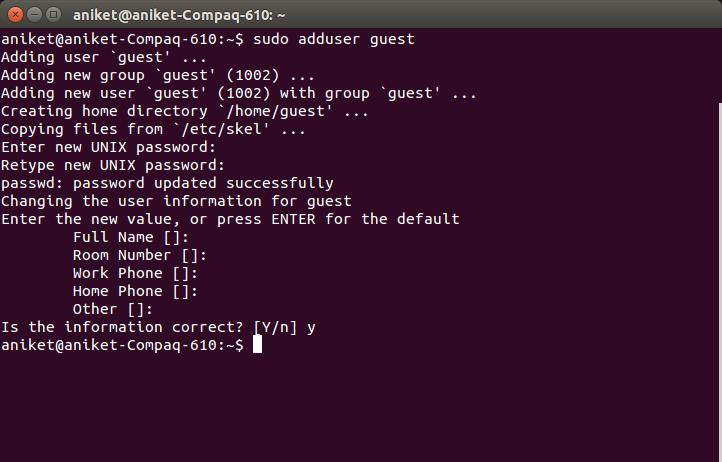
To add new user use following command -
  • sudo adduser <username>
 You will have to enter user details like name, phone no etc. You can just press enter if you do not wish to provide this information.


User should get created now. To verify
  1. You can see directory with same username getting created in /home folder.
  2. You can also inspect contents of /etc/passwd file. You should now start seeing row corresponding to this new user

Lastly to change user you can use following command
  • su <username>
You will need to provide corresponding users password.

Adding user to sudoers list

 Just creating a user will not grant it administrative privileges. This user can't use sudo command and thereby not execute tasks that requires administrative privileges.

To add a user to sudoers list you can execute following command - 
  • sudo adduser <username> sudo
Note that the user from which you execute this command should be in sudoers list.


 Personalizing User profile

What I mean here by personalizing is setting environment variables and aliases that user will need in his or her daily usage. For example lets say a developer create his/her account and now want JAVA_HOME variable set. Sure it can be exported and be done for the day but lets see how we can permanently set it.

All of this magic happens in a file called .bashrc that is located in the home folder of user. You can export your variable or set aliases here. For eg

  • export PATH=$PATH:$HOME/firefox/adt-bundle-linux-x86-20140702/sdk/tools:$HOME/firefox/adt-bundle-linux-x86-20140702/sdk/build-tools:$HOME/firefox/adt-bundle-linux-x86-20140702/sdk/platform-tools


For demo purpose lets create an alias to print hello world. Go to ~/.bashrc file and add following line

  • alias hw='echo hello world!'
save the file. Then in console just type hw and you should see "Hello World!" printed.


This was just an example you can set alias to command use frequently use.

Note : If you making any change in the .bashrc file you will have to open a new terminal window to see the effects. If you want to see the changes in same terminal you have to use source command as show in screenshot above.
  • source ~/.bashrc

Changing file permissions 

To change a permission of a file or a folder you can use chmod command. Yo give all read, write and execute permissions to all - user, group, others you can use - 

  • chmod ugo+rwx filename
 You can mix and match u,g,o and r,w,x combinations.
  • u = user
  • g = group
  • o = others
  • r = read
  • w = wite
  • x = execute
  • + = adds the specified modes to the specified classes
  • - =  removes the specified modes from the specified classes
  • = = the modes specified are to be made the exact modes for the specified classes
Also

  • r  = 4
  • w = 2
  • x = 1

Use this with caution. You don't want to give others unauthorized access to your profile.

Also if you want to do this action recursively you can use -R option.

If you want to change ownership of a file or a directory you can use chown command.

To change file owner user you can use
  • sudo chown <username> <filename>
To cahnge file owner group you can use
  • sudo chown :<groupname> <filename>
Or to change both user and group simultaneously
  • sudo chown <username>:<groupname> <filename> 


  Removing an User

To remove an existing user simply execute following command -
  • sudo userdel <username>
You will see row corresponding to this user in /etc/passwd file will get removed.

Note : Though user gets deleted it's home directory will not get deleted. You have to manually delete it. To delete users home directory use following command
  • sudo rm -rf /home/<user_directoryname>

Finding all files owned by a particular User/Group

For finding files owned by a group you can use 
  • find directory-location -group {group-name} -name {file-name}
For finding files owned by a user you can use
  • find directory-location -user {username} -name {file-name}

Related Links

t> UA-39527780-1 back to top