Tuesday, 20 May 2014

java.lang.ClassNotFoundException: org.springframework.web.servlet.DispatcherServlet

java.lang.ClassNotFoundException: org.springframework.web.servlet.DispatcherServlet 

I was stuck for last couple of days on this error. So made it the title of this post. A very simple exception - ClassNotFound. We know the jar is missing but what if we know that the exception persists even if the jar is present.

I used Ivy as my dependency manager. To know more on Apache Ivy you can refer to my detailed post I posted earlier.

My directory Structure was


There are two ways to resolve this error

  1. Either move your libraries to WEB-INF/lib . Because this is the folder from where Eclipse searches for corresponding jars. OR
  2. Let Eclipse know that it can search the jars from ivy library folder which is not same as WEB-INF/lib.  So now I will explain how to resolve above problem with 2nd approach in Eclipse.

  • Right click the project and select properties. Now go to Deployment Assembly.


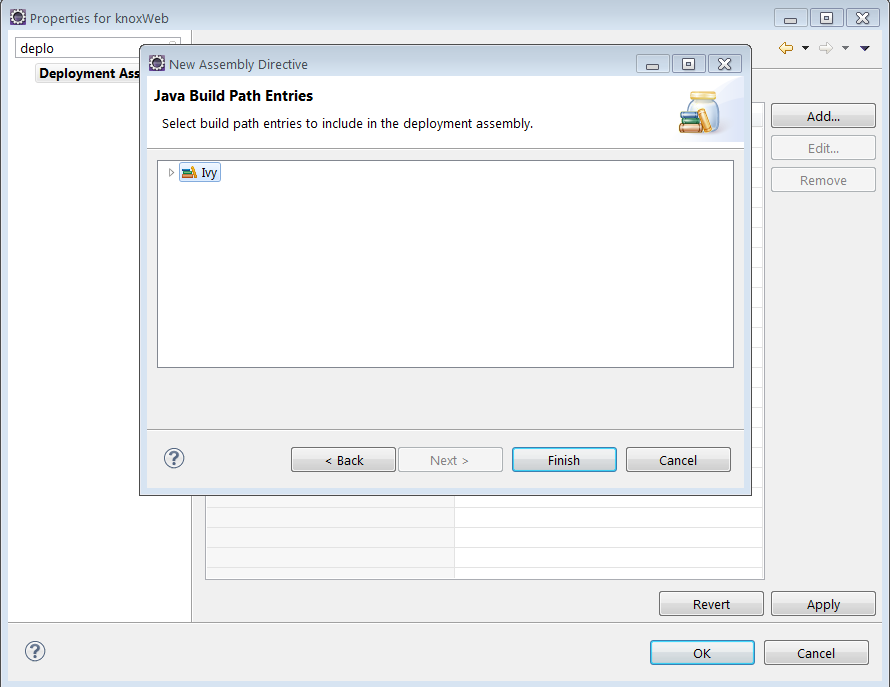
  • Now select Add and select Java build path entries.


  • Ivy option is automatically populated. Select that.


  • And you are done.Select Apply and Ok. ClassNotFound Exception vanishes.


That's it for resolving the issue. This issue may also occur if you genuinely don't have the corresponding jar in the lib folder :P . In that case you have to add the Jar. Dependencies I used for my Spring MVC project were

        <dependency org="org.springframework" name="spring-core" rev="4.0.3.RELEASE"/>
        <dependency org="org.springframework" name="spring-context" rev="4.0.3.RELEASE"/>
        <dependency org="org.springframework" name="spring-web" rev="4.0.3.RELEASE"/>
        <dependency org="org.springframework" name="spring-webmvc" rev="4.0.3.RELEASE"/>
        <dependency org="org.springframework" name="spring-beans" rev="4.0.3.RELEASE"/>

Important Links

Saturday, 10 May 2014

Download and Install cURL on Windows

Introduction to cURL

As per Wiki

cURL is a computer software project providing a library and command-line tool for transferring data using various protocols. The cURL project produces two products, libcurl and cURL. It was first released in 1997.

In this post we will see how do we install this tool and use it to perform some common HTTP requests like GET.

Installing cURL on Windows

  1. Go to curl Download Wizard
  2.  Select curl executable
  3. Select Win32 or Win64
  4. Then select package for it(Eg generic/cygwin) as per your requirement
  5. Then you will have to select version. You can select unspecified.
  6. This will directly take you to download link which on click will give you popup to download the zip file.
  7. Extract the zip to get the executable.(I have put the executable in C:\Curl
  8. Add this folder in your environment variables and you are done.

  9. You can then execute curl command from cmd.


PS : I had some problems with proxy. Though I don't have one cURL seems to pick it from somewhere. I was using that proxy about a year ago and have not used since. Not sure where cURL picks this confog from. But as a workaround I have use

curl --noproxy * websiteURL


This will essentially disable proxy. But you may not have to do so.

For more reading on various practical usages of curl command you may refer to

15 Practical Linux cURL Command Examples

Important Links

Sunday, 20 April 2014

Installing and using Apache Ivy as dependency manager.

Apache Ant

Before we head on to Apache Ivy lets take some time to understand Apache ant.  Almost every programmer must be knowing what ant is and must have used it sometime or the other. For those who are not aware of it Ant is a Java library and a command line tool. It is mainly used for building java programs.

What is Apache Ant?

Apache Ant is a Java library and command-line tool whose mission is to drive processes described in build files as targets and extension points dependent upon each other. The main known usage of Ant is the build of Java applications. Ant supplies a number of built-in tasks allowing to compile, assemble, test and run Java applications. Ant can also be used effectively to build non Java applications, for instance C or C++ applications. More generally, Ant can be used to pilot any type of process which can be described in terms of targets and tasks. 

More information about Apache Ant can be found their HomePage. You can download Apache Ant from here.

Getting started with Apache Ant

Lets get started with installation of Apache Ant. This is needed for Apache ivy. Download the zip file from  this link. Go ahead and extract it. I have version 1.7.1 and the folder name is apache-ant-1.7.1.  And I have extracted it in the location C:\Users\athakur\Softwares. 

  •  Open command prompt and type ant. 


You will get ant is not a recognized command . That's right extracting ant is not enough you need to add it to the environment variables so that the command is recognized by the command line.

Now lets add the ant path to environment variables. 

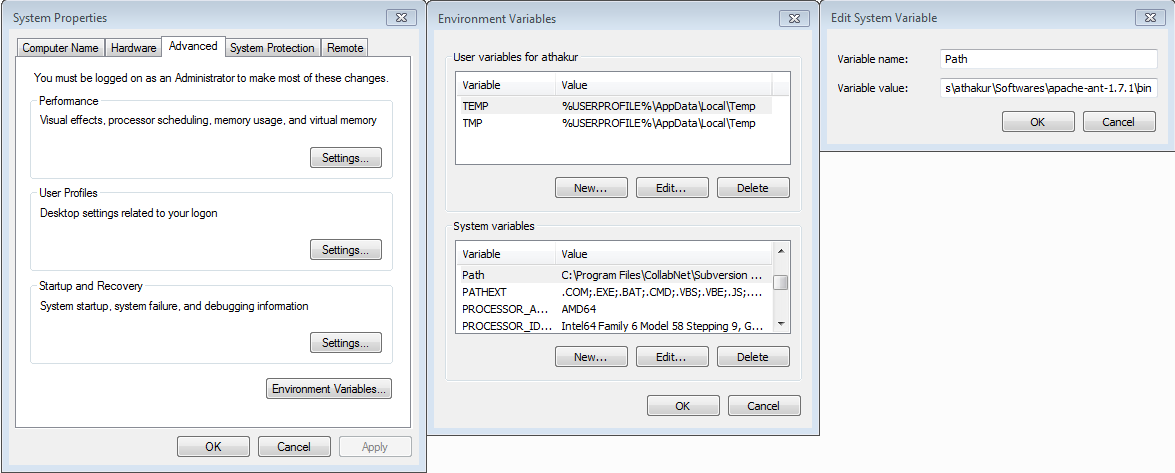
  • Right click on My Computer and select properties . Now on the left Panel under Control Panel Home select Advanced System Properties. Click on it.
You will see a window like below -


At the bottom you can see Environment Variables.. button. Click on it . This will open another window. Under System variables find a variable name PATH. Edit it and append the path to the lib folder under your extracted ant folder to it. For me it is C:\Users\athakur\Softwares\apache-ant-1.7.1\bin.


 And you are done. Again open the command prompt and type ant.  This time you should see some message like build.xml not found. That means ant is now installed. Whenever you execute ant by default it will search for build.xml file in the current folder for the targets to execute.


That's all for the ant.

Using Apache Ant

This post is not really to demonstrate ant usage. So I am skipping this part. But with above setup it should not be very difficult. You can refer to a very simple example below to get started - 


Note : Ant has some predefine ant tasks like javac(for compiling), java(for running) mkdir(creating directory) etc.

What is Apache Ivy?

Apache Ivy™ is a powerful dependencies manager with transitive dependencies support and much more features.

With Apache Ivy you define the dependencies of your module in an xml file, called an ivy-file. Then you usually ask Apache Ivy to retrieve your dependencies to a local lib dir, and it does it for you by locating the artifacts of your dependencies in repositories, such as a maven2 repository for instance.

Dependency Manager ????


Heard of Dependency Manager before? Yes / No ? Lets understand it now.

When ever you are creating a Java Project you may require some additional dependencies. In layman's language you need functionalities that are already implemented and you just import it in your project and use it without wasting time implementing it yourself.  

Let me give an example. Lets say you are creating a Java program that needs to carry out database operation. You will need the driver jar for that. For example JDBC jar for MYSql. What you generally do is download it manually and add it to your projects class path. Looks straightforward isn't it? But now imaging you have hundreds of this dependencies..... does not sound so simple now... does it? Also imagine you have n projects each requiring hundred of same dependencies. You will have to manually download it (once) and add it to classpath of all the projects(n times). To avoid all these there are dependency managers. 

You will have a configuration file per project which defines what dependencies you need. Dependency manager will scan this file download all the dependencies and add it to your projects class path. Smarter way ... isn't it?Want the same for another project simply copy the configuration file to that project. Also since a common cache is maintained for downloaded dependency, dependencies are directly used from cache. So no need to download again.

That's all for why would one go for a dependency manager. 
As far as why would one use Apache Ivy (given that there are other dependency managers like Maven) I would recommend to read their features page and FAQ.  Again I am not saying it is the best dependency manager out there. But I find it simple and powerful enough to suit my basic project needs. 

Installing Apache Ivy

Apache Ivy is already integrated with Apache Ant.Now if you see the lib folder of your ant folder  you will see ivy.jar file there. 

Apache Ivy is integrated with Apache Ant, the most popular Java build management system, so Apache Ivy follows Apache Ant design principles. If you have Apache Ant skills, you already have Apache Ivy skills! The plugin mechanism in Apache Ivy follows the Apache Ant model. Also like Apache Ant, Apache Ivy supports macrodefs and file imports from configuration.

If it is not there no big deal.You may be using an older version. Download the version you want here, unpack the downloaded zip file wherever you want, and copy the ivy jar file into your ant lib directory (ANT_HOME/lib). Here ANT_HOME is your ant folder. 

For more information you can see their Installation page. 

Getting started with Apache Ivy

So lets get started. I use Eclipse so I am going to show how to use Ivy with Eclipse. Of course you can do the same without an IDE as well. You can simply execute command like ant ivy-resolve from command line. Don't worry about the command for now. Only understand it is same with or without and IDE. Only instead of manually executing the commands IDE does it on it's own. 

Note : Without any settings, Ivy retrieves files from the maven 2 repository.

I hope you have installed Eclipse. In Eclipse go to 

  • Help --> Install new Software 
  • In the URL field put http://www.apache.org/dist/ant/ivyde/updatesite
  • Let it fetch the required data. Select the plugin and install it.

You may need to restart Eclipse for changes to get reflected.
After you restart Apache Ivy is all set for use.

Once you install ivy and create a project ivy should be automatically be enabled for that project. But if the project was already created and then you installed ivy then in that case
  • Right click on the project and select add ivy dependency management.
Once that is Done.
  • Again right click the project select new and add ivy.xml file.


It will be in the root of the project. It is an xml file with following syntax

<ivy-module version="2.0" xmlns:xsi="http://www.w3.org/2001/XMLSchema-instance"
       xsi:noNamespaceSchemaLocation="http://ant.apache.org/ivy/schemas/ivy.xsd">
    <info
        organisation=""
        module="TestWebProject"
        status="integration">
    </info>
</ivy-module>

Now lets add some dependencies in it. Lets say you are making a Spring project. So you need Spring framework jars. As mentioned previously Ivy be default looks into maven repository to download dependent jars. So you can search your dependencies there.

So to add Spring jars you will search for spring in the site.


 You will see the dependencies. Each dependency will have

  1. Group 
  2. Artifact ID
  3. Version
Now entries that you make in an ivy file is something like

  • <dependency org="commons-lang" name="commons-lang" rev="2.0"/> 
 To convert this into an Ivy dependency declaration, all you have to do is use the groupId as organization, the artifactId as module name, and the version as revision.

You can find more information about this in their Quick Start page.

I will now add spring-context and spring-core dependencies.

Ivy file will now look like

<ivy-module version="2.0" xmlns:xsi="http://www.w3.org/2001/XMLSchema-instance"
       xsi:noNamespaceSchemaLocation="http://ant.apache.org/ivy/schemas/ivy.xsd">
    <info
        organisation=""
        module="TestWebProject"
        status="integration">
    </info>
    
    <dependencies>
        <dependency org="org.springframework" name="spring-core" rev="4.0.3.RELEASE"/>
        <dependency org="org.springframework" name="spring-context " rev="4.0.3.RELEASE"/>
    </dependencies>
    
</ivy-module>


  • Now simply right click the ivy file and select add Ivy library. This will download the dependencies and add it to your project.
You can see the corresponding jars in the ivy library once above process finishes.


And also you are done. You can search maven repo to find details of dependencies you need for your project and then add it to the ivy file. It's that simple.

Note : For Apache Ivy all dependencies are downloaded once in the folder .ivy which is in your users home folder. For me it is
  • C:\Users\athakur\.ivy
If a dependency is required first this local cache is searched. If found that is used. If not then it is downloaded from the repository.

How Apache Ivy works?


For more details you can refer to their official principle page.

Monday, 14 April 2014

Understanding and handling java.util.Date and time concept in Java.

Date and Time need do definitions and explanations but it is very crucial how they are handled programmatically. It is so because time is different in different countries. To understand these differences in time, it is divided into various time zones. You can synchronize your time based on which timezone your country lies in.

What difference does it make?

Lets consider you have an online calender which stored all the birthdays of all your contacts. Lets say you are from Bangalore(India) and it is past 12 which means it's time to celebrate you best friends birthday. You will expect it to be shown in the app that connect to the online calender. But lets say the server which hosts the online calender is in Washington DC(USA) and there it is still 2 P.M. So your friends birthday is not until next 10 hours? Absolutely not. You want to celebrate it right away :)

So how do we resolve the difference?

To resolve this difference a standard time is defined known as UTC(Coordinated Universal Time). Most of the time zones on land are offset from Coordinated Universal Time (UTC) by a whole number of hours (UTC−12 to UTC+14).

As per wiki

Coordinated Universal Time (French: Temps Universel Coordonné, UTC) is the primary time standard by which the world regulates clocks and time. It is one of several closely related successors to Greenwich Mean Time (GMT). For most purposes, UTC is synonymous with GMT, but GMT is no longer precisely defined by the scientific community.

Even if you see you computers time you will find it is set to some time zone. For example my laptop is configured as follows - 


Solution

So simple solution to above problem is let your servers run on UTC time zones. Now for request from each country convert the time from the countries time zone to UTC and then do a normal comparison with servers time(which is already in UTC). So for example if the request is coming from India with time shown above I would deduct 5.30 hours from the time stamp to covert it into UTC and then compare/process. Also it is generally preferred to convert the time to UTC on client itself and send the time stamp in UTC to the server instead of doing the conversion on server.

Operating on Date in Java

In java Date is in java.util package.  Simplest way to print current date is

    public static void main(String args[]){

        System.out.println(new Date()); //or
        System.out.println(new Date(System.currentTimeMillis()));

    }

Now lets say you are given a time stamp and you have to check if it is older than 90 days or not. Also lets consider this comparison happens on server side and that the timestamp received as well as the server time is in UTC. So no need to handle time zones explicitly.

So lets say you have time stamp(String) like
 
Thu Sep 28 20:29:30 JST 2000

Now you have to check if this date is older than 90 days. We know it is but lets see how it is done programmatically. 

    public static void main(String args[]) throws ParseException {

        String target = "Thu Sep 28 20:29:30 JST 2000";
        DateFormat df = new SimpleDateFormat("EEE MMM dd kk:mm:ss zzz yyyy");
        Date result =  df.parse(target);

        Calendar cal = Calendar.getInstance();
        cal.add(Calendar.DATE, -90);
        Date dateBefore30Days = cal.getTime();

        if(result.compareTo(dateBefore30Days) <= 0){
            System.out.println("Time stamp is older than 90 days");
        }
        else {
            System.out.println("Time stamp is not older than 90 days");
        }

    }


You know the answer but I hope you get the point. Also note that Date class implements Comparable interface due to which you can use compareTo() method.

Related Links

Wednesday, 26 March 2014

Find the Number Occurring Odd Number of Times

Question : 

You are given an array of integers. All integers in the array appear exactly twice except one integer. Your goal is to find and return that integer. For example if you have an array 1,2,3,4,4,3,2,1,7,9,9 you have to return number 7.

Approach : 

When I first encountered this question in an interview I said we can use a HashMap. Iterate the array and store the integers in the Map with key as the integer itself and value as the count of number of times the integer occurs in the array. Then simply iterate the HashMap and return the key with value equal to one. 

Time Complexity -> O(N)
Space Complexity -> O(N)

But there is a better approach - one that involves no extra space. 

Do bitwise XOR of all the elements. Finally we get the number which has odd occurrences i.e 1 in our case.

Later I found out that it is very common question asked.   The questions is
Given an array of positive integers. All numbers occur even number of times except one number which occurs odd number of times. Find the number in O(n) time & constant space.(GeeeksForGeeks

You can see the simple C solution in above link. Below code is for the original question I encountered. So simply xor all the values and return the result.

Code :


package Arrays;

/**
 * Created by Aniket on 3/26/14.
 */
public class SingleCountElementFinder {

    public static int returnNumber(int[] array){

        int no = array[0];

        for(int i=1;i<array.length;i++){
            no = no ^ array[i];
        }

        return no;

    }


    public static void main(String args[]){

        int[] array = new int[]{1,2,3,4,4,3,2,1,7,9,9};
        System.out.println("Single occurring element : " + SingleCountElementFinder.returnNumber(array));

    }

}

Output : 

Single occurring element : 7

NOTE : If you did not know already XOR operation return true if the inputs are different and false if they are same. So if you XOR a number with itself you will get back 0. And if you XOR any number with 0 you get back that number. So in above question each pair of same numbers when XORed gives 0 and finally when XORed with a single instance of the number gives back that number.
t> UA-39527780-1 back to top