Wednesday, 8 January 2014

How join() and yield() methods of Thread class work?

Background

A very general interview question on Threads in java. If you have 3 threads t1, t2 and t3 how would you structure your program such that t1 completes it execution before t2 and t2 before t3. To answer this question we need to know how join() method of Thread class works.

About join() method

The join method allows one thread to wait for the completion of another. If t is a Thread object whose thread is currently executing,
t.join();
causes the current thread to pause execution until t's thread terminates. 

Note : Like sleep(), join() responds to an interrupt by exiting with an InterruptedException.


Let us now understand the method behavior with an example. Run the following code

package in.blogspot.iquestions;

public class ThreadDemo implements Runnable {

    public void run() {
        try {
            System.out.println("Thread has started running. Waiting for 2 seconds");
            Thread.sleep(2000);
            System.out.println("Back from waiting.Terminating ThreadDemo now");
        } catch (InterruptedException e) {
            System.out.println("Thread was interrupted");
            e.printStackTrace();
        }
    }
    
    public static void main(String args[]) throws InterruptedException{
        System.out.println("Main thread started");
        Thread demoThread = new Thread(new ThreadDemo());
        System.out.println("Starting ThreadDemo thread");
        demoThread.start();
        demoThread.join(); //comment this line in 1st run
        System.out.println("Terminating main thread");
    }

}

What we are doing in above code is that we are running a thread ThreadDemo from our main thread. Now in 1st run comment out the demoThread.join(); line and execute the program.

Output on running without calling join()

Main thread started
Starting ThreadDemo thread
Terminating main thread
Thread has started running. Witing for 2 seconds
Back from waiting.Terminating ThreadDemo now

This shows that main thread exited before ThreadDemo thread. What we want in next run is for the main thread to wait until ThreadDemothread is executed. So in 2nd run use the join() call.

Output on running with join()

Main thread started
Starting ThreadDemo thread
Thread has started running. Waiting for 2 seconds
Back from waiting.Terminating ThreadDemo now
Terminating main thread

Here you will notice main thread will wait for ThreadDemo thread to complete it's execution. Only then the main thread continues with it's execution and terminates.

Summary of join() method of Thread class

Currently executing thread(whichever that is) will stop it's execution until the thread on which join is called has completed it's execution.
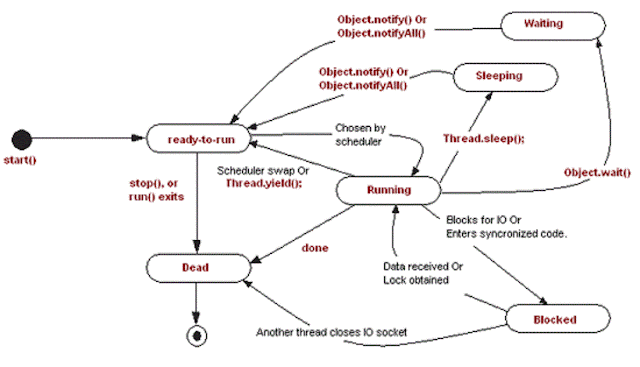
Understanding yield() method in java

 Before we go to yield() lets understand the difference between sleep() and wait() -
Main difference between wait and sleep is that wait() method release the acquired monitor when thread is waiting while Thread.sleep() method keeps the lock or monitor even if thread is waiting. Also, wait for method in Java should be called from synchronized method or block while there is no such requirement for sleep() method. 

Coming back to yield(), it's little different than wait() and sleep(), it just releases the CPU hold by Thread to give another thread an opportunity to run though it's not guaranteed who will get the CPU. It totally depends upon thread scheduler and it's even possible that the thread which calls the yield() method gets the CPU again.


I have copied yield() and diagram part from the link mentioned in the related links section below. However note that Object.notify() or Object.notifyAll() does not wake up sleeping thread. That part is not correct is diagram above.

Monday, 6 January 2014

Serialization in Java

What is Serialization?

Serialization is the process of converting an object into a series of bytes, so that the object can be easily saved to persistent storage or streamed across a communication link. The byte stream can then be deserialised - converted into a replica of the original object.

What is java.io.Serializable?

Serializable is a marker interface just like  Cloneable interface. It does not have any methods to be implemented. Implementing this interface will allow an object to be serialized.

Example


package in.blogspot.iquestions;

import java.io.File;
import java.io.FileInputStream;
import java.io.FileNotFoundException;
import java.io.FileOutputStream;
import java.io.IOException;
import java.io.ObjectInputStream;
import java.io.ObjectOutputStream;
import java.io.Serializable;

public class SerializationExample {
    
    public static void main(String args[]) throws ClassNotFoundException{
        
        Employee employee = new Employee("Sam",18);
        
        try {
            ObjectOutputStream oos = new ObjectOutputStream(new FileOutputStream(new File("C:\\Users\\Aniket\\Desktop\\test.txt")));
            ObjectInputStream ois = new ObjectInputStream(new FileInputStream(new File("C:\\Users\\Aniket\\Desktop\\test.txt")));
            System.out.println("Object before serialization : " + employee);
            oos.writeObject(employee);
            Employee employeeCopy = (Employee)ois.readObject();
            System.out.println("Object after deserialzation : " + employeeCopy);
            
        } catch (FileNotFoundException e) {
            e.printStackTrace();
        } catch (IOException e) {
            e.printStackTrace();
        }
    }
}

class Employee implements Serializable{
    
    private static final long serialVersionUID = 8414822319246756172L;
    String name;
    int age;
    
    public Employee(String name, int age){
        this.name = name;
        this.age = age;
    }

    @Override
    public String toString() {
        return "Name is " + name + " and Age is " + age;
    }
    
}

Output :
Object before serialization : Name is Sam and Age is 18
Object after deserialzation : Name is Sam and Age is 18

What is use of serialVersionUID?

When you try your class to implement Serializable interface compiler will issue an warning.


Which clearly indicated you need something called serialVersionUID in your class. I use Eclipse and it gave me 3 quick fixes shown above.

  1. Add default serial version ID : Selecting this option will assign some default value hard coded in the IDE.
  2. Add generated serial version ID : This will generate a hash value depending on your variables/methods and use it in your class.
  3. The 3rd option is just a suppress warning to tell compiler you can ignore this warning.
This variable is private static final long . Default value option gives

private static final long serialVersionUID = 1L;

where as  generated one was as follows

private static final long serialVersionUID = 8414822319246756172L;

If you do not assign it then java compiler will generate it and normally it’s equal to hashCode of object.

This is about the variable but the main question still remains - Whats the need for it?

Well it is used to match the versions of the class. I will bring up this point again later but serialVersionUID is the only variable that is static and is serialized(state is stored) because static variables are not serialized. Just note this at the moment we will discuss it later. If these value on deserialization does not match exception InvalidClassException in thrown.

Are there any other ways to serialize an object other than Java serialization?

Answer to that would be Yes!
  1. For object serialization, instead of implementing the Serializable interface, a developer can implement the Externalizable interface, which extends Serializable. By implementing Externalizable, a developer is responsible for implementing the writeExternal() and readExternal() methods. As a result, a developer has sole control over reading and writing the serialized objects.
  2. XML serialization is an often-used approach for data interchange. This approach lags runtime performance when compared with Java serialization, both in terms of the size of the object and the processing time. With a speedier XML parser, the performance gap with respect to the processing time narrows. Nonetheless, XML serialization provides a more malleable solution when faced with changes in the serializable object.

What happens if the object to be serialized includes the references to other serializable objects?

If the object to be serialized includes the references to other objects whose class implements serializable then all those object’s state also will be saved as the part of the serialized state of the object in question. The whole object graph of the object to be serialized will be saved during serialization automatically provided all the objects included in the object’s graph are serializable.

 What happens if an object is serializable but it includes a reference to a non-serializable object?

If you try to serialize an object of a class which implements serializable, but the object includes a reference to an non-serializable class then a ‘NotSerializableException’ will be thrown at runtime.

Are the static variables saved as the part of serialization?

This is the question I was referring to earlier. Let us discuss this now. Recollect the purpose of Serialization. It is used to convert Object(with a state) to series if bytes and deserialization gives us back the exact same copy. The main purpose is to save the Object state and static variables do not form part of object state(rather they are part of Class state). So the answer is No! Static variables belong to the class and not to an object they are not the part of the state of the object so they are not saved as the part of serialized object. 

What is a transient variable?

 It has a very simple definition. Variables which you do not wish to save on serialization or which should not be a part of object state is to be defined as transient. These variables are not included in the process of serialization and are not the part of the object’s serialized state.

What will be the value of transient variable after de-serialization?

Transient variables will get default values[More details] on deserialization.  

Does the order in which the value of the transient variables and the state of the object using the defaultWriteObject() method are saved during serialization matter?

 Yes! As while restoring the object’s state the transient variables and the serializable variables that are stored must be restored in the same order in which they were saved. 

If a class is serializable but its superclass in not , what will be the state of the instance variables inherited  from super class after deserialization?

The values of the instance variables inherited from superclass will be reset to the values they were given during the original construction of the object as the non-serializable super-class constructor will run.

To serialize an array or a collection all the members of it must be serializable. True /False?

Arrays are Objects in Java and can be serialized like any other Object. Point to note here is that for an array to be serializable all of it's members must be serializable.

Suppose super class of a new class implement Serializable interface, how can you avoid new class to being serialized?

One of the tricky interview question in Serialization in Java. If Super Class of a Class already implements Serializable interface in Java then its already Serializable in Java, since you can not unimplemented an interface its not really possible to make it Non Serializable class but yes there is a way to avoid serialization of new class. To avoid java serialization you need to implement writeObject() and readObject() method in your Class and need to throw NotSerializableException from those method.

Note : Serialization doesn't write out the object a second time. It sees you're writing out an object that is already written out, and only writes out a reference to the object that previously was serialized.

For example see the code below -

public static void main(String args[]) throws FileNotFoundException, IOException, ClassNotFoundException
{
    ObjectOutputStream oos = new ObjectOutputStream(new FileOutputStream(new File("data.txt")));
    Human human = new Human();
    human.setAge(21);
    human.setName("Test");
    System.out.println("Human : " + human);
    oos.writeObject(human);
    human.setName("Test123");
    oos.writeObject(human);
    ObjectInputStream ois = new ObjectInputStream(new FileInputStream(new File("data.txt")));
    Human newHuman1  = (Human)ois.readObject();
    System.out.println("newHuman1 :" + newHuman1);
    Human newHuman2  = (Human)ois.readObject();
    System.out.println("newHuman2 :" + newHuman2);
}


and it prints -

Human : Human [age=21, name=Test]
newHuman1 :Human [age=21, name=Test]
newHuman2 :Human [age=21, name=Test]

NOTE :  All classes get a serialVersionUID - one is generated by the serialization runtime if you haven't declared one. By declaring a serialVersionUID you're telling the serialization runtime, don't generate one because you know the serialized form of the classes is compatible with one built earlier.

 The serialization runtime associates with each serializable class a version number, called a serialVersionUID, which is used during deserialization to verify that the sender and receiver of a serialized object have loaded classes for that object that are compatible with respect to serialization. If the receiver has loaded a class for the object that has a different serialVersionUID than that of the corresponding sender's class, then deserialization will result in an InvalidClassException. A serializable class can declare its own serialVersionUID explicitly by declaring a field named "serialVersionUID" that must be static, final, and of type long:


    ANY-ACCESS-MODIFIER static final long serialVersionUID = 42L;


    If a serializable class does not explicitly declare a serialVersionUID, then the serialization runtime will calculate a default serialVersionUID value for that class based on various aspects of the class, as described in the Java(TM) Object Serialization Specification. However, it is strongly recommended that all serializable classes explicitly declare serialVersionUID values, since the default serialVersionUID computation is highly sensitive to class details that may vary depending on compiler implementations, and can thus result in unexpected InvalidClassExceptions during deserialization. Therefore, to guarantee a consistent serialVersionUID value across different java compiler implementations, a serializable class must declare an explicit serialVersionUID value. It is also strongly advised that explicit serialVersionUID declarations use the private modifier where possible, since such declarations apply only to the immediately declaring class--serialVersionUID fields are not useful as inherited members.

Related  Links

Saturday, 4 January 2014

Difference between data encapsulation and data abstraction in java.

Four important concepts or principles in Java are
  1. Data encapsulation
  2. Data abstraction
  3. Inheritance
  4. Polymorphism
In this post, we will look at first two principles - Encapsulation and Abstraction.

General View

            Data Encapsulation simply means wrapping relevant data together whereas Data abstraction means abstracting out the underneath logic and expose only the relevant part to the user. This is a very generic statement. We will get back to the what it actually means in Java language.


Data Encapsulation in Java

        Java is an Object oriented programming language, That means everything in java is an object and these objects interact with each other to form an executing program. Classes are nothing but blueprints of Objects and these classes form the very basis of Data encapsulation.

Data encapsulation in its simple form means wrapping the relevant data in a class and controlling its access. This is also sometimes associated with another keyword - Data Hiding. When we design the class we essentially write encapsulation rules.Lets us go a little deeper to understand this concept - 

We define functions or variables with some access modifier to control the extent of scope that can be used or accessed by the user. Common examples are declaring a variable private and giving its access using getter and setter methods or declaring a method private if it's only use is withing the class.

This is also why it is referred to as data hiding. We hide the data and provide only desired access to it.

Note: Keywords encapsulation and data hiding are used synonymously everywhere. It should not be misunderstood that encapsulation is all about data hiding only. When we say encapsulation, emphasis should be on grouping or packaging or bundling related data and behavior together. 

A very basic encapsulation example

public class Animal {
    
    private String type;

    public String getType() {
        return type;
    }

    public void setType(String type) {
        this.type = type;
    }
        
}


Data Abstraction in Java

Data abstraction simply means generalizing something to hide the complex logic that goes underneath. Consider a very simple example of computer science - subtraction. If we have two variables  "a" and "b" we simply say their subtraction is (a-b). But what is really happening behind the scenes? These variables are stored in main memory in binary format. The processor processes the subtract information which really takes place using two's complement method. Again in the processor, we have gates that actually carry out the procession. Even inside gates, there are pins and 1 and 0 simple means high and low signals. 

Even though the process is so complex underneath a normal software developer developing some financial application need not know every small detail. This is because the concept has been abstracted out. This is what abstraction means in a general terminology.

 We only expose the method signature to the user. All user needs to know is what input or parameters he must supply to the function and what is the desired output or return value.

Lets us take an example to understand this function -

Let's say we have an interface Animal and it has a function makeSound(). There are two concrete classes Dog and Cat that implement this interface. These concrete classes have separate implementations of makeSound() function. Now let's say we have an animal(We get this from some external module). All user knows is that the object that it is receiving is some Animal and it is the user's responsibility to print the animal sound. One brute force way is to check the object received to identify it's type, then typecast it to that Animal type and then call makeSound() on it. But a neater way is to abstracts thing out. Use Animal as a polymorphic reference and call makeSound() on it. At runtime depending on what the real Object type is proper function will be invoked.    

I would like to end this post by saying Data encapsulation(Data hiding) is wrapping and controlling access of logically related data in a class. One of the aspects of this is by using suitable access modifiers. Data abstraction, on the other hand, is generalizing the concept so that the underlying complex logic is hidden from the user. In java, this is achieved by using interfaces and abstract classes.

Encapsulation is combining related logic data (variables and methods) whereas Abstraction is hiding internal implementation details and expose only relevant details to the user. In a way you can Abstraction is achieved by Encapsulation.

 A generic diagram to understand the difference is provided below. Note complex logic is on the circuit board which is encapsulated in a touchpad and a nice interface(buttons) is provided to abstract it out.


Useful Links


Tuesday, 31 December 2013

A glance at Linux achievements - 2013

First of all it's almost time for new year. So wishing everyone a Very happy New Year! May all your wishes come true. And may Linux and FOSS have more amazing next year.


2013 was an amazing year for Linux and it is just not possible to list them all. However I am attempting to list a few ones here.

  • ANDROID


    Year 2013 marked a record of Android phone activation. The figure is 1.5 Million devices per day. Over 900 million Android devices have been activated since being introduced in 2008 and this figure is set to hit 1 billion soon. Not to mention behind Android as an OS there is Linux kernel running.
  • Raspberry pi

    One of the greatest development ever in the history of Low cost, single board computer was Raspberry pi. Raspberry pi was intended to promote Linux computing in schools and elsewhere and the board was highly welcomed by the FOSS Community and still continuing.
  • Linux in Space

    Manager of the Space Operations Computing (SpOC) for NASA Keith Chuvala said , "We migrated key functions from Windows to Linux because we needed an operating system that was stable and reliable -- one that would give us in-house control. So if we needed to patch, adjust, or adapt, we could." Distribution used was
    Debian,
  •  SteamOS

    2013 was indeed a great and marvelous year for Linux gaming.
    SteamOS, a debian based distribution was designed for Stream Machine Game Console and released in the mid of December 2013. With the trend of GNU/Linux into gaming environment is certainly a very welcome act.
  • The Firefox OS

    Firefox OS
    (project name: Boot to Gecko, also known as B2G) is a Linux-based open-source operating system for smartphones and tablet computers.It was released in late April 2013. The ARM based Linux distribution for mobile devices, shows promising future.
  • Ubuntu Touch


    Canonical released Ubuntu Touch 1.0, the first developer/partner version on 17 October 2013, along with Ubuntu 13.10 that "primarily supports the Galaxy Nexus and Nexus 4 phones. 
  • Chromebooks

    Chromebooks wins the market of notebook computers, with a lot of high-end manufacturer viz., Samsung, ASUS giving place to GNU/Linux OS over Proprietary OS’s.
  • Kali Linux


    From the developers of BackTrack Linux comes Kali Linux. Kali is a Linux distribution based on Debian, the mother OS which is Primarily developed for Penetration testing and shares a lot of repository of Debian, one of the most rich Distro. Kali Linux holds the record download, in a very less time of its release.
  • Android Kitkat


    One of the Most awaited release was named Kitkat. Google Announced Android 4.4 aka KitKat in September of 2013. Although the release had been expected to be number 5.0 aka Key Lime Pie. Kitkat has been optimised to run on a large variety of devices having a minimum of 512 MB RAM.
  • Miscellaneous

    Linux was not only constrained to desktops, tablets and smartphones but was also used in automobiles, space station, robots etc. 2013 was indeed a great year for Linux and the coming years we may see further boost.

Some memorable Linux milestones


Sunday, 29 December 2013

How to reverse a LinkedList in Java?

A very basic interview question asked. In an earlier post we had see the LinkedList class in java and how to reverse it using Collections.revere(). You can refer to that post. Point to note that the LinkedList class defined in java is infact a doubly Linked list and that is not what the interviewer will be interested in.  Yes you can give that as your 1st answer as it will depict you have java knowledge but at some point you will have to fall back to basics.

Before we write the code to actually reverse the LinkedList lets write the code for the LLNode  data structure which will form our LinkedList.

LinkedList Node 

public class LLNode {

    int value;
    LLNode nextNode;

    public  LLNode(int value){
        this.value = value;
    }

    public int getValue() {
        return value;
    }

    public void setValue(int value) {
        this.value = value;
    }

    public LLNode getNextNode() {
        return nextNode;
    }

    public void setNextNode(LLNode nextNode) {
        this.nextNode = nextNode;
    }

    public static void printLL(LLNode head){
        if (head != null){
            System.out.println(head.getValue());
            printLL(head.getNextNode());
        }
    }
}

Note : In this data structure we have also provided a method printLL() to print the Linked List.

Now lets go ahead and write our code to reverse this Linked List

Linked List Reversal

public class LLReverser {

    public static LLNode reverse(LLNode root){

        if(root.getNextNode() == null){
            return root;
        }

        LLNode next = root.getNextNode();
        root.setNextNode(null);

        while(next != null){
            LLNode temp = null;
            if(next.getNextNode() != null)
                temp = next.getNextNode();
            next.setNextNode(root);
            root = next;
            next = temp;
        }

        return root;

    }
}

Now let us test it out

Testing the logic

    public static void main(String args[]){

        LLNode root = new LLNode(1);
        LLNode second = new LLNode(2);
        root.setNextNode(second);
        LLNode third = new LLNode(3);
        second.setNextNode(third);
        LLNode fourth = new LLNode(4);
        third.setNextNode(fourth);

        System.out.println("Before");
        LLNode.printLL(root);
        System.out.println("After");
        LLNode.printLL(LLReverser.reverse(root));

    }

Output :

Before
1
2
3
4
After
4
3
2
1

t> UA-39527780-1 back to top