Showing posts with label Java8. Show all posts

Sunday, 26 February 2017

Working with primitives in Streams

Background

In one of the previous posts on Understanding Java 8 Stream API we saw basics of working with primitives. To reiterate - there are 3 types of primitive streams -
  1. IntStream: Used for the primitive types int, short, byte, and char
  2. LongStream: Used for the primitive type long
  3. DoubleStream: Used for the primitive types double and float
These primitives are special they got their own Optional classes , their own functional interfaces. With our previous understanding in place we will see this new working with primitives.


Why primitive Streams?

Lets say we have a list of integers and we want to compute its average. How would you do it with streams.

    public static void main(String[] args) {
        List<Integer> myIntList = Arrays.asList(1,2,3,4,5);
        Optional<Integer> sum = myIntList.stream().reduce((x,y) -> x + y);
        long count  = myIntList.stream().count();
        double avg = sum.get()/count;
        System.out.println(avg);
    }

Output : 3.0

Well sure based on what we know so far we aced this. But do you see any drawback in above approach?
  • You are creating stream twice from the list - once to get sum and once to get count.
  • Then you are dividing it to get the average.
Though this works Java provides more optimized solution and this is where IntStream comes into picture.

    public static void main(String[] args) {
        List<Integer> myIntList = Arrays.asList(1,2,3,4,5);
        OptionalDouble intAvg = myIntList.stream().mapToInt(x->x).average();
        System.out.println(intAvg.getAsDouble());
    }


Output : 3.0

That's the one liner with IntStream. mapToInt() intermediate operation gives you a IntStream which has predefined operations like sum(), average() etc. Couple of points to note -
  • mapToInt() intermediate method returned IntStream
  •  average() terminal operation on IntStream returned a OptionalDouble. This is a new class. Notice it is not Optional<Double> but entirely a new class. 
  • Also note the method to get double value from  OptionalDouble class. It is getAsDouble() and not get() like you would have seen in Optional class.
  • Recollect out discussion before primitives have their own streams eg. IntStream , own Optional classes eg. OptionalInt and even functional interfaces eg. BooleanPredicate. But that's for later.
  • sum() on IntStream returns int instead of OptionalInt because if there are no elements in the Stream it would return 0.
    public static void main(String[] args) {
        List<Integer> myIntList = Arrays.asList(1,2,3,4,5);
        int sum = myIntList.stream().mapToInt(x->x).sum();
        System.out.println(sum);
    } 


Output : 15

NOTE : If you want Object stream back from primitive streams you can use mapToObj intermediate method.

Creating primitive streams

Now that we have basics out of our way let see how can we create a primitive stream. One method we already saw by using mapToInt() method on a normal Stream. Similarly you have mapToLong() and mapToDouble() methods to get LongStream and DoubleStream respectively. 

Other normal methods that we say in Stream class like of() or generate() or iterate() still apply to primitive streams as well.

    public static void main(String[] args) {
        System.out.println("of");
        IntStream.of(1,2,3,4,5).forEach(System.out::print);
        System.out.println("\ngenerate");
        IntStream.generate(() -> 1).limit(4).forEach(System.out::print);
        System.out.println("\niterate");
        IntStream.iterate(1,(x) -> x+1).limit(4).forEach(System.out::print);
    }

Output :
of
12345
generate
1111
iterate
1234

Some other methods are 
  • range(int startInclusive, int endExclusive)
  • rangeClosed(int startInclusive, int endInclusive)
    public static void main(String[] args) {
        System.out.println("range");
        IntStream.range(1, 5).forEach(System.out::print);
        System.out.println("\nrangeClosed");
        IntStream.rangeClosed(1, 5).forEach(System.out::print);
    } 


Output :
range
1234
rangeClosed
12345

Example demonstrates for InStream but same applies for LongStream and DoubleStream as well.

NOTE : Notice the range limits. For range end limit is exclusive where as for rangeClosed it is inclusive.


Understanding summaryStatistics

Now lets say we have an IntStream and we need to to output difference between the max element and min element in the stream. How would you do that?

    public static void main(String[] args) {
        List<Integer> myList = Arrays.asList(1,2,3,4,5);
        int max = myList.stream().mapToInt(x -> x).max().getAsInt();
        int min = myList.stream().mapToInt(x -> x).min().getAsInt();
        int difference = max - min;
        System.out.println("Difference : " + difference);
    }

Output :
Difference : 4
which is expected since 5-1 = 4.
But again we need to create stream twice and need two terminal operations to get result. Java helps us here too with summaryStatistics method.

    public static void main(String[] args) {
        List<Integer> myList = Arrays.asList(1,2,3,4,5);
        IntSummaryStatistics intSummaryStatistics = myList.stream().mapToInt(x -> x).summaryStatistics();
        int difference = intSummaryStatistics.getMax() - intSummaryStatistics.getMin();
        System.out.println("Difference : " + difference);
    }

Output :
Difference : 4

Related Links

Monday, 20 February 2017

Java 8 Collection improvements

Background

With introduction of functional interfaces and Lambda expressions there are some new APIs introduced in collection class. In this post we will look at those.


Conditional removal [Collection.removeIf]

There is a new method added in Collection interface as -

  • boolean removeIf(Predicate<? super E> filter)

This basically removes elements from the list that match the predicate. No magic here if you see the default implementation it is as follows -

    default boolean removeIf(Predicate<? super E> filter) {
        Objects.requireNonNull(filter);
        boolean removed = false;
        final Iterator<E> each = iterator();
        while (each.hasNext()) {
            if (filter.test(each.next())) {
                each.remove();
                removed = true;
            }
        }
        return removed;
    }

So you basically iterate on your collection using a iterator and remove all elements that match your predicate condition. 

Let's see an example now -

        List<String> countriesList = new ArrayList<>();
        countriesList.add("India");
        countriesList.add("Srilanka");
        countriesList.add("Nepal");
        countriesList.add("Italy");
        countriesList.add("Bhutan");
        countriesList.add("Ireland");
        System.out.println("Before : " + countriesList);
        countriesList.removeIf(s -> s.startsWith("I"));
        System.out.println("After : " + countriesList);

Output is :
Before : [India, Srilanka, Nepal, Italy, Bhutan, Ireland]
After : [Srilanka, Nepal, Bhutan]

As you can see all Strings in the list starting with 'I' are removed as defined by the predicate.


Updating all elements(List.replaceAll)

Another method that is introduced is - 

  • void replaceAll(UnaryOperator<E> o)
It replaces all the elements in the current List to new values based on the UnaryOperator.  Let's revisit above example with minor modification -

        List<String> countriesList = new ArrayList<>();
        countriesList.add("India");
        countriesList.add("Srilanka");
        countriesList.add("Nepal");
        countriesList.add("Italy");
        countriesList.add("Bhutan");
        countriesList.add("Ireland");
        System.out.println("Before : " + countriesList);
        countriesList.replaceAll(s -> "Miss " + s);
        System.out.println("After : " + countriesList);


and the output is :
Before : [India, Srilanka, Nepal, Italy, Bhutan, Ireland]
After : [Miss India, Miss Srilanka, Miss Nepal, Miss Italy, Miss Bhutan, Miss Ireland]

NOTE : Recollect UnaryOperator takes a single argument of type t and returns a value of same type t. If you wish to recollect common functional interfaces check out the links in the Related links section below.

Iterating over a List (List.forEach)

Another useful method that is added in List is -
  • public void forEach(Consumer<? super E> action)
It lets you take an action for  all the elements in the List. Lets see this now.

        List<String> countriesList = new ArrayList<>();
        countriesList.add("India");
        countriesList.add("Srilanka");
        countriesList.add("Nepal");
        countriesList.add("Italy");
        countriesList.add("Bhutan");
        countriesList.add("Ireland");
        System.out.println("Before : " + countriesList);
        countriesList.forEach(System.out::println);
        System.out.println("After : " + countriesList);


and the output is -
Before : [India, Srilanka, Nepal, Italy, Bhutan, Ireland]
India
Srilanka
Nepal
Italy
Bhutan
Ireland
After : [India, Srilanka, Nepal, Italy, Bhutan, Ireland]


NOTE : Careful. Do not alter the List with the action or you will get - java.util.ConcurrentModificationException

NOTE : Above method reference System.out::println is same as saying s -> System.out.println(s)

New APIs added in Map

New APIs added -
  1. merge()
  2. putIfAbsent() : puts in map is key is not present or the value is null
  3. computeIfPresent() : calls the BiFunction when the requested key is found
  4. computeIfAbsent() : calls the BiFunction when the key isn’t present or
    is null
 Let's see merge first -

It's method is as follows -

    default V merge(K key, V value,
            BiFunction<? super V, ? super V, ? extends V> remappingFunction) {
        Objects.requireNonNull(remappingFunction);
        Objects.requireNonNull(value);
        V oldValue = get(key);
        V newValue = (oldValue == null) ? value :
                   remappingFunction.apply(oldValue, value);
        if(newValue == null) {
            remove(key);
        } else {
            put(key, newValue);
        }
        return newValue;
    }
Above is the default implementation in Map method.  Quick observation :
  1. If old value is null, bifunction is never called. 
  2. If mapping function returns null key is removed from the Map.
 computeIfAbsent and computeIfPresent are again similar. They also take bifunction. computeIfAbsent executes the mapping function if key is not present or value is null and computeIfPresent executes the mapping function if key is present and the value is not null. Following are it's signatures -

  •     default V computeIfAbsent(K key, Function<? super K, ? extends V> mappingFunction)
  •     default V computeIfPresent(K key, BiFunction<? super K, ? super V, ? extends V> remappingFunction)


Related Links


Saturday, 18 February 2017

Working with Java 8 Date/Time API

Background

Before Java 8 how do we work with Date/Time. We used java.util.Date class. Like below -

        Date d = new Date();
        System.out.println(d);
        Date cd = Calendar.getInstance().getTime();
        System.out.println(cd);
        System.out.println(d.getDate());
        System.out.println(d.getTime());
        System.out.println(System.currentTimeMillis());//same as getTime above

Output :
Sat Feb 18 10:42:17 IST 2017
18
1487394737708
1487394737728

In Java 8 Date/Time APIs are completely revamped. Most of them are in java.time.* package. We will look at them now.

New Date/Time classes

New Date/Time classes are as follows -
  • LocalDate : Contains date. No time or timezone.
  • LocalTime : Contains time. No date or timezone.
  • LocalDateTime : Contains date and time but not the timezone.
  • ZonedDateTime : Contains date and time with the timezone.
You can test it as follows -

            System.out.println(LocalDate.now());
            System.out.println(LocalTime.now());
            System.out.println(LocalDateTime.now());
            System.out.println(ZonedDateTime.now()); 


For me the output is as follows -
2017-02-18
10:59:48.133
2017-02-18T10:59:48.133
2017-02-18T10:59:48.134+05:30[Asia/Kolkata]

NOTE : Notice how T separator is used to separate Date and time in the output of  LocalDateTime and ZonedDateTime. In the output of ZonedDateTime what you see as +5.30 is relative to GMT. So current time in Asia/Kolkata time zone is 5hours 30 minutes ahead of GMT.


More ways to create Date/Time class instances

LocalDate :
public static LocalDate of(int year, int month, int dayOfMonth)
public static LocalDate of(int year, Month month, int dayOfMonth)

NOTE : month starts with 1 (end at 12) unlike normal convention used Java which is 0 based. Also Month is an enum. You cannot compare it with int.

LocalTime :
public static LocalTime of(int hour, int minute)
public static LocalTime of(int hour, int minute, int second)
public static LocalTime of(int hour, int minute, int second, int nanos)

LocalDateTime:
public static LocalDateTime of(int year, int month, int dayOfMonth, int hour, int minute)
public static LocalDateTime of(int year, int month, int dayOfMonth, int hour, int minute, int second)
public static LocalDateTime of(int year, int month, int dayOfMonth, int hour, int minute, int second, int nanos)
public static LocalDateTime of(int year, Month month, int dayOfMonth, int hour, int minute)
public static LocalDateTime of(int year, Month month, int dayOfMonth, int hour, int minute, int second)
public static LocalDateTime of(int year, Month month, int dayOfMonth, int hour, int minute, int second, int nanos)
public static LocalDateTime of(LocalDate date, LocalTime time)

NOTE : Notice how you can can use a LocalDate and LocaleTime instance to create a LocalDateTime instance.

ZonedDateTime :
public static ZonedDateTime of(int year, int month, int dayOfMonth, int hour, int minute, int second, int nanos, ZoneId zone)
public static ZonedDateTime of(LocalDate date, LocalTime time, ZoneId zone)
public static ZonedDateTime of(LocalDateTime dateTime, ZoneId zone)

NOTE : Notice how each constructor needs a ZoneId instance.  It basically tells what time zone we are working with. You can print out all the ZoneIds available or filter it to suit your needs.

        ZoneId.getAvailableZoneIds().stream()
        .filter(z -> z.contains("Kolkata"))
        .sorted().forEach(System.out::println);
        ZoneId zone = ZoneId.of("Asia/Kolkata");
        System.out.println(zone);


And it prints :
Asia/Kolkata
Asia/Kolkata

NOTE : Note that there are no explicit constructors. You need to use static method as I have mentioned above. Also you will get DateTimeException if you pass invalid arguments

You can try :
        System.out.println(LocalDate.of(2017, 13, 21));
        System.out.println(LocalDate.of(2017, 2, 29));


You will get :

Exception in thread "main" java.time.DateTimeException: Invalid value for MonthOfYear (valid values 1 - 12): 13
    at java.time.temporal.ValueRange.checkValidValue(ValueRange.java:311)
    at java.time.temporal.ChronoField.checkValidValue(ChronoField.java:703)
    at java.time.LocalDate.of(LocalDate.java:267)
    at HelloWorld.main(HelloWorld.java:83)

and

Exception in thread "main" java.time.DateTimeException: Invalid date 'February 29' as '2017' is not a leap year
    at java.time.LocalDate.create(LocalDate.java:429)
    at java.time.LocalDate.of(LocalDate.java:269)
    at HelloWorld.main(HelloWorld.java:84)

NOTE : 2012 and 2016 are leap years.

Manipulating Date/Time

You can manipulate date/time as follows -

Using Periods

Period is well span of LocalDate. That means span consisting of Year, Month, Day, Week etc. 

Eg.

Period annually = Period.ofYears(1); // every 1 year
Period quarterly = Period.ofMonths(3); // every 3 months
Period everyTwoWeeks = Period.ofWeeks(2); // every 2 weeks
Period everyYearAndAWeek = Period.of(1, 0, 5); // every year and 5 days 


NOTE : There is no time involvement in Periods. You cannot use Period with LocalTime.Also note you cannot concatenate Period methods. Well you can technically but only last one will be picked and used since these are static methods. Eg.
Period incorrectUsage = Period.ofYears(2).ofWeeks(2); // every 2 week

Now lets try printing out a Period value -

System.out.println(Period.of(2, 12, 21));

It outputs : P2Y12M21D

Now lets analyze this string. It starts with a P denoting it's  a period. Then you have Y for years, M for months and D for day. If any of the parameters are not present then Java simply omits it (it will not say 0M).

Eg.

System.out.println(Period.of(2, 0, 21));

prints: P2Y21D
Also values greater than expected limit is fine. You can give months value as 14 and Java takes care of it.

Eg.

System.out.println(Period.of(2, 14, 21));

prints : P2Y14M21D

But while computing it will subtract 14M = 1Y and 2M. You get the point. Let's see one example of how it is used and then we move to next topic -

        LocalDate localDate = LocalDate.of(2017, 8, 2);
        System.out.println(locateDate.plus(Period.of(0, 1, 2)));


print : 2017-09-04
(Adds 0 years, 1 month and 2days to existing date.)

Also note the parameters in duration are Y,M and D. So if you give something like -

        System.out.println(Period.ofWeeks(2));

it will print : P14D

Using Duration

Same as Period but works with LocalTime rather than LocalDate. Like Period began with P Duration begins with PT (Period of time). As Period had parameters - Years,Months,Days - Y,M,D duration has Hours.Minutes,Seconds H,M,S.

Some examples -
Duration twoDays = Duration.ofDays(2); // PT48H
Duration hourly = Duration.ofHours(1); // PT1H
Duration everyTwoMinute = Duration.ofMinutes(2); // PT2M
Duration everyTwentySeconds = Duration.ofSeconds(20); // PT20S
Duration everyMilli = Duration.ofMillis(1); // PT0.001S

Duration and Period Usage 

Do not mix Period with Time and Duration with Date. Period is intended to be used with Date and Duration with Time. Refer following picture for reference.

Working with Instants

Instant class represents a specific moment in time in terms of GMT time zone. Simple example -

        Instant ins1 = Instant.now();
        Thread.sleep(1000);
        Instant ins2 = Instant.now();
        System.out.println(Duration.between(ins1, ins2));

and it prints : PT1.001S
That's a second and some time needed for processing.  You cannot use Instant with LocalDate or LocalTime or LocalDateTime. It has to be ZonedDateTime since it is associated with a time zone.

NOTE : Instant is related to ZonedDateTime but it always corresponds to GMT i.e point in time as per GMT.

Accounting for Daylight Savings Time

Daylight savings time is obeserved in some countries. In this clock is adjusted by an hour twice a year to make better use of the sunlight. This transition happens on Weekend Sunday 2 AM. So when clock is at 2 AM it is moved to 3 AM.

Lets say June 29, 2017, is the weekend that clocks spring ahead for daylight savings time. Now consider following code -

LocalDate date = LocalDate.of(2017, Month.JUNE, 29);
LocalTime time = LocalTime.of(1, 30);
ZoneId usZone = ZoneId.of("US/Eastern");
ZonedDateTime zonedDateTime1 = ZonedDateTime.of(date, time, usZone);
ZonedDateTime zonedDateTime2 = dateTime1.plus(1, ChronoUnit.HOURS);
long hours = ChronoUnit.HOURS.between(zonedDateTime1, zonedDateTime2);
int hours1 = dateTime1.getHour();
int hours2 = dateTime2.getHour();
System.out.println(hours + "," + hours1 + "," + hours2);

This will output 1,1,3. While the values are two hours apart, the time zone offset changes as well, making it only change from 6:30 GMT to 7:30 GMT.

NOTE : Java is smart enough to adjust for daylight savings time. So you don't have to worry about handling it in code. Logic may differ but you don't have to worry that it might cause exception or error.

Related Links


Sunday, 12 February 2017

Walking a directory using Streams API in java8

Background

In one of the previous posts we saw how we can traverse a directory in Java as part of NIO.2 APIs introduced in Java 8 using walkFileTree method and Path and FileVisitor arguments.
 In this post we will try to do the same thing but with stream APIs introduced in Java8.

Walking a directory using Streams API

In this we will use Files.walk(path) method that returns a Stream<Path> instance and traverse the directories in dept first pattern. This is lazy implementation which mean child directories are not actually loaded until it's parent is traversed.

In previous post we say how we can filter .java files using PathMatcher interface. In this post we will see how easy it is with Streams.

        Path path = Paths.get("/Users/athakur/Desktop/testDir");
        
        try {
            Files.walk(path)
            .filter(p -> p.toString().endsWith(".java"))
            .forEach(System.out::println);
            } catch (IOException e) {
                e.printStackTrace();
            }

and the output is : 
/Users/athakur/Desktop/testDir/innerTestDir1/test2.java
/Users/athakur/Desktop/testDir/innerTestDir1/test3.java
/Users/athakur/Desktop/testDir/innerTestDir2/test4.java
/Users/athakur/Desktop/testDir/test1.java

File structure is as follows -
  • testDir
    • test1.java
    • innerTestDir1
      • test2.java
      • test3.java
    • innerTestDir2
      • test4.java
As you can see it does a depth first search.

NOTE : By default the directories depth searched is Integer.MAX_VALUE. Keeping it default and having a deep/large directory structure may take a lot of time to search. So the walk method has an overloaded method that takes in integer parameter (walk(Path,int)) denoting dept of directories to be searched.

NOTE : Unlike earlier NIO.2 methods walk by default will not traverse symbolic links. This is to avoid traversing unnecessary paths or cyclic paths. But if you do wish to track symbolic links you can provide FOLLOW_LINKS option as a vararg to the walk() method. However you should provide a depth is this case to avoid unnecessary traversals. Also walk method keeps track of path traversed and if t detects a loop it will throws FileSystemLoopException.

Files class has other helpful methods as well for searching, listing and printing files -

        try {

            System.out.println("Printing Java regular files");
            Files.find(path, 10, (p, a) -> p.toString().endsWith(".java") && a.isRegularFile())
                    .forEach(System.out::println);
            System.out.println("Printing non directories files");
            // traverses only 1 depth
            Files.list(path).filter(p -> !Files.isDirectory(p)).map(p -> p.toAbsolutePath())
                    .forEach(System.out::println);

        } catch (IOException e) {
            e.printStackTrace();
        }


Output :
Printing Java regular files
/Users/athakur/Desktop/testDir/innerTestDir1/test2.java
/Users/athakur/Desktop/testDir/innerTestDir1/test3.java
/Users/athakur/Desktop/testDir/innerTestDir2/test4.java
/Users/athakur/Desktop/testDir/test1.java
Printing non directories files
/Users/athakur/Desktop/testDir/test1.java

NOTE : Notice how Files.list() traverses only 1 depth unlike Files.find() which traverses till the depth provided. Also notice how each method throws IOException since file may not actually be present.

Following picture shows difference between legacy file APIs and NIO2 APIs -


Related Links

Sunday, 29 January 2017

Java 8 Stream terminal operations - reduce vrs collect

Background

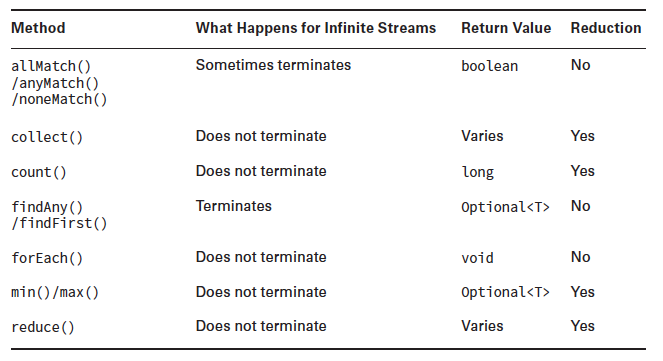
Following are some common terminal operations supported by Stream -


In this post we will see two of these - reduce() and collect(). As you can see they are reduction. They reduce stream to an object. Lets see each of them is detail now.


reduce()

reduce() method combines the stream into a single object. It can reduce the stream either to same same type as that of stream or different. Methods available for reduce are -

  • T reduce(T identity, BinaryOperator<T> accumulator)
  • Optional<T> reduce(BinaryOperator<T> accumulator)
  • <U> U reduce(U identity, BiFunction<U,? super T,U> accumulator, BinaryOperator<U> combiner)
Let's see some examples - 

        Stream<String> myStringStream = Stream.of("a","n","i","k","e","t");
        String stringResult = myStringStream.reduce("", (a,b) -> a + b);
        System.out.println("String reduce : " + stringResult);
        Stream<Integer> myIntegerStream = Stream.of(2,3,4,5,6);
        int intResult = myIntegerStream.reduce(1, (a,b) -> a * b);
        System.out.println("Intger reduce : " + intResult);

Output is -
String reduce : aniket
Intger reduce : 720

As you can see the 1st method gets the identity, then uses the 1st element of the stream and operates both to get a result. Then it takes the result and the 2nd element to process again and so on to finally return a result.

2nd method does not take an identity as an input well because it's not strictly mandatory but if you notice it returns an Optional value. There can be 3 cases here -
  1. If the stream is empty, an empty Optional is returned.
  2. If the stream has one element, it is returned.
  3. If the stream has multiple elements, the accumulator is applied to combine them.
For eg -

        Stream<Integer> myIntegerStream = Stream.of(2,3,4,5,6);
        Optional<Integer> intResult = myIntegerStream.reduce((a,b) -> a * b);
        if(intResult.isPresent()) {
            System.out.println("Intger reduce : " + intResult.get());
        }

And the output is again -
Intger reduce : 720

3rd method is used mainly when parallel Streams are involved. In that case you stream is divided into segments, accumulator is used to combine individual segments and then a combiner is used to combine those segments.

For reduce arguments to be used for parallel streams it must satisfy following properties -

  • The identity must be defined such that for all elements in the stream u ,
    combiner.apply(identity, u) is equal to u .
  • The accumulator operator op must be associative and stateless such that (a op b) op c is equal to a op (b op c) .
  •  The combiner operator must also be associative and stateless and compatible with the identity, such that for all u and t combiner.apply(u,accumulator.apply(identity,t)) is equal to accumulator.apply(u,t) .
NOTE : As part of the parallel process, the identity is applied to
multiple elements in the stream, resulting in very unexpected data. So above properties should be obeyed.

collect()

collect() is again a reduction called mutable reduction. In this we use mutable objects like StringBuilder or ArrayList to collect data. Note the result here is different type than that of the stream content. Methods available are -

  • <R> R collect(Supplier<R> supplier, BiConsumer<R, ? super T> accumulator, BiConsumer<R, R> combiner)
  • <R,A> R collect(Collector<? super T, A,R> collector)
 For eg.

        Stream<String> myStringStream = Stream.of("a","n","i","k","e","t");
        StringBuilder stringResult = myStringStream.collect(StringBuilder::new, StringBuilder::append,StringBuilder::append);
        System.out.println("String reduce : " + stringResult.toString());
        myStringStream = Stream.of("a","n","i","k","e","t");
        TreeSet stringTreeSetResult = myStringStream.collect(TreeSet::new, TreeSet::add,TreeSet::addAll);
        System.out.println("String reduce : " + stringTreeSetResult);


And the output is -
String reduce : aniket
String reduce : [a, e, i, k, n, t]

Or you can use the collectors -

        Stream<String> myStringStream = Stream.of("a","n","i","k","e","t");
        List<String> resultList = myStringStream.collect(Collectors.toList());
        System.out.println(resultList);


Output -
[a, n, i, k, e, t]

For using collect() on parallel streams make sure your mutable container is thread safe. You can use concurrent collections for this.

Joining Collector

Simple joining collector will join elements with the specified delimiter -

    public static void main(String[] args) {
        List<String> myList = Arrays.asList("I","am","groot");
        String result = myList.stream().collect(Collectors.joining(" "));
        System.out.println("Collect using joining : " + result);
    }

Output :
Collect using joining : I am groot

Collecting into Map

You can also collect your stream results into Map. Lets see how -

    public static void main(String[] args) {
        List<String> myList = Arrays.asList("I","am","groot");
        Map<Integer,String> result = myList.stream().collect(Collectors.toMap(x -> x.length(),x -> x));
        System.out.println("Collect using toMap : " + result);
    

Output :
Collect using toMap : {1=I, 2=am, 5=groot}
Here we are creating a map with key as length of the element in the stream and value as the element itself.
But wait what happens when I give input as - Arrays.asList("I","am","groot","ok") . There are two elements that will map to same key since both "am" and "ok" have same length. Well java does not know what to do and will just throw an Exception - 
Exception in thread "main" java.lang.IllegalStateException: Duplicate key am
    at java.util.stream.Collectors.lambda$throwingMerger$0(Collectors.java:133)
    at java.util.HashMap.merge(HashMap.java:1245)
You can always tell Java how to handle this scenario as follows -
    public static void main(String[] args) {
        List<String> myList = Arrays.asList("I","am","groot","ok");
        Map<Integer,String> result = myList.stream().collect(Collectors.toMap(x -> x.length(),x -> x, (a,b) -> a+ " " + b));
        System.out.println("Collect using toMap : " + result);
    }
Output :
Collect using toMap : {1=I, 2=am ok, 5=groot}
This is because we have given (a,b) -> a+ " " + b which bean if there are two elements mapping to same key concatenate them using a space and out it in the for the corresponding key.

Collect using grouping

 You can collect using grouping to which will collect your data in the map based on your condition. Eg. - 

    public static void main(String[] args) {
        List<String> myList = Arrays.asList("I","am","groot","ok");
        Map<Integer,List<String>> result = myList.stream().collect(Collectors.groupingBy(String::length));
        System.out.println("Collect using toMap : " + result);
    }

Output :
Collect using toMap : {1=[I], 2=[am, ok], 5=[groot]}

Collect using Partitioning

Partitioning is a special type of grouping in which map just has two entries (for keys) and those are true and false. You need to give a predicate for the method to put stream element in correct bucket. Eg - 

    public static void main(String[] args) {
        List<String> myList = Arrays.asList("I","am","groot","ok");
        Map<Boolean,List<String>> result = myList.stream().collect(Collectors.partitioningBy(s -> s.length() > 3));
        System.out.println("Collect using toMap : " + result);
    }

Output :
Collect using toMap : {false=[I, am, ok], true=[groot]}

Difference between reduce() and collect()

  •  If you have immutable values such as ints,doubles,Strings then normal reduction works just fine. However, if you have to reduce your values into say a List (mutable data structure) then you need to use mutable reduction with the collect method.
  • In the case of reduce() we apply the function to the stream elements themselves where as in the case of collect() we apply the function to a mutable container.

Related Links

Saturday, 28 January 2017

Creating Threads with the ExecutorService

Background

You know there are 2 ways to create your threads and run it asynchronously from main thread. You can either -
  • extend Thread class or
  • implement Runnable interface and pass it to a thread.
Consider the following example -

    public static void main(String[] args) {
        
        Thread t1 = new Thread(() -> System.out.println("My ThreadId : " + Thread.currentThread().getId()));
        Thread t2 = new Thread(() -> System.out.println("My ThreadId : " + Thread.currentThread().getId()));
        Thread t3 = new Thread(() -> System.out.println("My ThreadId : " + Thread.currentThread().getId()));
        t1.start();
        t2.start();
        t3.start();
        System.out.println("Main ThreadId : " + Thread.currentThread().getId());
        
    }


One of the possible outputs is -
My ThreadId : 10
My ThreadId : 12
Main ThreadId : 1
My ThreadId : 11

Obviously, we cannot determine for sure the order of execution of threads as it is dependent on OS level thread scheduler. We will not get into that. Important points to note here is how we created and started a thread, used lambda expression for the runnable interface.


Runnable as we know is a functional interface and can be used in lambda expressions -

@FunctionalInterface
public interface Runnable {
    public abstract void run();
}


So that's the normal way. But why manage thread starting/stopping, handing results if any on your own when Java provides you with a convenient way. And this is where ExecutorService comes into the picture.

In this post we will see what ExecutorService is, how we can use to create and run threads, various types of methods it supports etc.

Creating Threads with the ExecutorService

ExecutorService is an interface but it has multiple concrete implementations we can use. It is essentially a framework that creates and manages threads for you. It has other features like thread pooling and scheduling we will come to later.

Consider the following example -

    public static void main(String[] args) {
        
        ExecutorService service = null;
        try {
        service = Executors.newSingleThreadExecutor();
        service.execute(() -> System.out.println("My 1st ThreadId : " + Thread.currentThread().getId()));
        service.execute(() -> System.out.println("My 2nd ThreadId : " + Thread.currentThread().getId()));
        service.execute(() -> System.out.println("My 3rd ThreadId : " + Thread.currentThread().getId()));
        System.out.println("Main ThreadId : " + Thread.currentThread().getId());
        } finally {
        if(service != null) service.shutdown();
        }
        
    }


Here we have used newSingleThreadExecutor which is basically ExecutorService with a single thread. You send multiple runnable implementations to it and that single thread runs it sequentially. Since it is a single thread it's output will be sequential too (and hence predictable). However, you cannot predict the complete output of the above program as main threads output you cannot predict with respect to other threads as that runs independently.

One of the possible outputs of the above program -

My 1st ThreadId : 10
Main ThreadId : 1
My 2nd ThreadId : 10
My 3rd ThreadId : 10

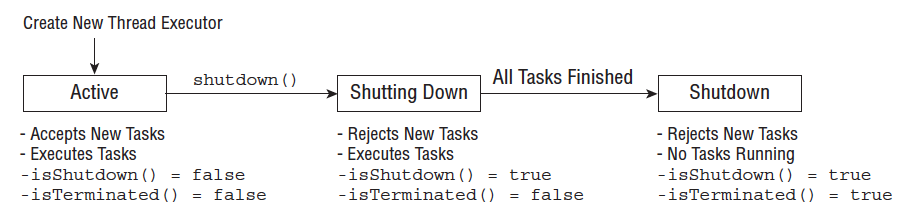
Another thing you might have noticed above is the shutdown method. You need to be very careful here. You need to call shutdown on executor service when you are done because executor service create non-daemon threads and your application will never shut down if those threads are not stopped. Once shutdown is called no more tasks are accepted by executor service but it continues running already accepted tasks. Below is it' life cycle -


NOTE: ExecutorService interface does not implement AutoCloseable, so you cannot use a try-with-resources statement.

Submitting tasks to executor service

As you must have seen in the code snippet above we use executor services execute() method to submit our runnables. But the problem with these is we never really know if the runnables have completed their operation. Fortunately, there is another method we can use called submit() - this also takes a Runnable as an argument but returns a Future object that can be used to determine if task is complete or not.

    public static void main(String[] args) throws InterruptedException, ExecutionException {
        
        ExecutorService service = null;
        try {
        service = Executors.newSingleThreadExecutor();
        Future<?> result =  service.submit(() -> System.out.println("My 1st ThreadId : " + Thread.currentThread().getId()));
        while(!result.isDone()){
            System.out.println("Executor task in progress");
            Thread.sleep(100);
        }
        System.out.println("Executor task completed : " + result.isDone());
        } finally {
        if(service != null) service.shutdown();
        }
        
    }


Above prints -

Executor task in progress
My 1st ThreadId : 10
Executor task completed : true

In case you noticed Future object also has a get method. So if you are wondering what does it return then the answer is it depends. So far we have seen simply Runnable instance provided to submit method and since we know Runnable does not return anything (void return type) get on corresponding future will also return null. However, there is another interface called Callable similar to Runnable.

  • Callable allows you to return a value. 
  • It also allows you to throw checked exceptions.
  • And you can use it in submit/execute method of ExecutorService.
  • And yes it's also a functional interface like Runnable.

@FunctionalInterface
public interface Callable<V> {
    /**
     * Computes a result, or throws an exception if unable to do so.
     *
     * @return computed result
     * @throws Exception if unable to compute a result
     */
    V call() throws Exception;
}


The Callable interface was introduced as an alternative to the Runnable interface,
since it allows more details to be retrieved easily from the task after it is completed.

Sample example for Callable interface use -

    public static void main(String[] args) throws InterruptedException, ExecutionException {
       
        ExecutorService service = null;
        try {
        service = Executors.newSingleThreadExecutor();
        Future<String> result =  service.submit(() -> "My 1st ThreadId : " + Thread.currentThread().getId());
        while(!result.isDone()){
            System.out.println("Executor task in progress");
            Thread.sleep(100);
        }
        System.out.println("Executor task completed : " + result.get());
        } finally {
        if(service != null) service.shutdown();
        }
       
    }


Output -

 Executor task in progress
Executor task completed: My 1st ThreadId : 10


NOTE: Callable functional interface is similar to Supplier functional interface. Both don't take any argument and return something. If Java compiler at any point finds this ambiguous then it will throw a compilation error. You need to typecast it to work.

Eg.

    public static void useMe(Supplier<String> input) {}
    public static void useMe(Callable<String> input) {}
    
    public static void main(String[] args) {
        useMe(() -> {throw new IOException();}); // DOES NOT COMPILE
    }


The compilation will fail with following error -

The method useMe(Supplier<String>) is ambiguous for the type Java8Demo

Also, note Callable can throw checked exception while Supplier cannot. But Java does not check this as seen in above example.

NOTE: Until now we have only seen a single threaded executor service. But you can have a pool as well i.e executor service with a predefined number of threads in the pool.

 For eg.  ExecutorService executor = Executors.newFixedThreadPool(5);

NOTE: ExecutorService was introduced since Java 5.

Related Links

Sunday, 13 November 2016

Common Functional interfaces introduced in Java 8

Background

In series of previous posts on Java 8 features we saw Lambda expressions and how to used them.
 We saw basis of a Lambda expression is a functional interface. And then we saw a few functional interfaces as part of introduction to method references -
In this post well see some common functional interfaces that Java provides that you can use at your disposal.


Common Functional interfaces

A new package is introduced since Java 8 that holds all such common functional interfaces. This package is
  • java.util.function
 If you are using JDK 8 in your IDE do check out these classes. You can also find all these in oracle documentation -
 For now lets go over some commonly used functional interfaces from this package.

NOTE : The convention used here is generic type T for type parameter, for second type parameter the next letter U and for a distinct return type R is used as the generic type.


Predicate : Takes a single paramter of any type and returns a boolean [boolean test(T t)]

Predicate functional interface looks like - 

@FunctionalInterface
public interface Predicate<T> {
    /**
     * Evaluates this predicate on the given argument.
     *
     * @param t the input argument
     * @return {@code true} if the input argument matches the predicate,
     * otherwise {@code false}
     */
    boolean test(T t);
    //other methods
}

It accepts a parameter of type T and returns a boolean.

Note I have skipped other methods in the interface like default and static methods (Remember default methods and static methods do not affect the functional status of an interface)

Eg.

Predicate<String> emptyPredicate = x -> x.isEmpty();
System.out.println(emptyPredicate.test(""));
System.out.println(emptyPredicate.test("abc"));

Output :
true
false

Consumer : Takes a single paramter of any type and has a void return type [void accept(T t)]

Consumer looks like below -

@FunctionalInterface
public interface Consumer<T> {
    /**
     * Performs this operation on the given argument.
     *
     * @param t the input argument
     */
    void accept(T t);
}

It accepts an input parameter of type T and does does not return anything (has a void return type). It consumes the input.

Eg.

Consumer<String> printFunc = x -> System.out.println(x);
printFunc.accept("Hello World!"); 

Output :
Hello World!

Supplier : Does not take any parameter and returns any type [ T get()]

Supplier looks like -

@FunctionalInterface
public interface Supplier<T> {
    /**
     * Gets a result.
     *
     * @return a result
     */
    T get();
}
 
Eg.
Supplier<String> strSupplier = () -> "SOME_CONSTANT";
System.out.println(strSupplier.get());

Output :
SOME_CONSTANT

I know that a lame example :) You can simple define and use a constant. Have used this to help you understand how it works. All constructor references in method references are essentially variants of supplier.

UnaryOperator : Takes a single paramter of any type and returns of same type. [R apply(T t)]

UnaryOperator actually extends Function functional interface. Function looks like below -

public interface Function<T, R> {
    /**
     * Applies this function to the given argument.
     *
     * @param t the function argument
     * @return the function result
     */
    R apply(T t);
}

So as you see it take input parameter of type T and returns a parameter of type R. UnaryOperator is a special kind of Function where T and R are same. So it take input and returns output of same type.

Eg.

UnaryOperator<String> prefixOp = (name) -> "Mr. " + name; 
System.out.println(prefixOp.apply("Aniket"));

Output :
Mr. Aniket


That's some common functional interface. Now there are "Bi" versions of above interfaces that take in 2 inputs. For eg.
  • BiConsumer<T, U> : Similar to Consumer<T> but takes two inputs of type T and consumes them i.e void return type.
  • BiPredicate<T, U> : Similar to Predicate<T> but takes 2 inputs of type T and U and returns a boolean.
  • BiFunction<T, U, R> : Similar to Function<T, R> but takes 2 inputs of type T and U and returns a parameter of type R.
  • BinaryOperator<T> :  Similar to UnaryOperator<T> but takes 2 parameters of type T and returns parameter of type T.
These functional interfaces are summarized below -

Summary


Related Links 


Saturday, 10 September 2016

Whats new in Java 8?

Background

In this post well see what all new features and changes have come in Java 8 release.


Whats new?

  • Default methods are introduced in Java 8 which means you can provide a method with body in your interface and all concrete classes need not implement it. They can override it though. For this you need to use default keyword in your method. More details - 
  • Java 8 has also introduced Lambda expressions which use functional interface. You can see more details below - 
  • As you know for local variables to be accessed by methods in anonymous classes the local variable needs to be declared final. However from Java 8 it is accessible even if it is effectively final. More details - 
  • As we know variables in an interface are implicitly public, final and static and methods we public and abstract. Though variables remain the same with default methods we saw in point no 1 , non abstract methods are also possible in interface now. Also static methods are allowed in interface now. Following code snippet works from Java 8 -

    public interface TestInterface {
        
        String NAME = "Aniket";    //public static final 
        String getName();    //public abstract
        
        default String getDefaultName() { // non static default method
            return "Abhijit";
        }
        
        static String getNonDefaultSttaicName() { // static methods
            return NAME;
        }
    
    }
    
  • Changes in HashMap : The performance has been improved by using balanced trees instead of linked lists under specific circumstances. It has only been implemented in the classes -
    • java.util.HashMap,
    • java.util.LinkedHashMap and 
    • java.util.concurrent.ConcurrentHashMap.

      This will improve the worst case performance from O(n) to O(log n).
  • Java 8 introduces another new syntax called method references. Covered it a new post -
  • Java 8 also introduces a new class called Optional which is a better way to represent values that may not be present instead of using null and and adding null checks -
  • Lastly another Major change that was added was the Stream APIs. You can read all about it in following post -
  • Walking a directory using Streams API in java. This is a continuation of previous post NIO.2 API directory traversal using Path and FileVisitor which was introduced in java 7.
  • In java 8 new APIs are added for Date and Time. 
  • Collection improvements in Java 8


Related Links

Understanding Java 8 Stream API

Background

Java 8 has introduced a new set of APIs involving streams. They look very powerful in term of processing and also uses functional programming we have seen in last couple of posts (Refer links in Related Links section at the bottom of this post). In this post we will essentially see what these streams are and how can we leverage it.

Streams in Java are essentially sequence of data which you can operate upon together it's called a pipeline. A stream pipeline is essentially comprising of 3 parts -

  1. Source : Think of it as data set that is used to generate a stream. Depending on data set a stream can be finite or infinite.
  2. Intermediate operations : Intermediate operations are operations that you perform on the given data set to filter or process your data. You can have as many intermediate operations as you desire. These intermediate operations give you the processed stream so that you can perform more intermediate operation on them. Since streams use lazy evaluation, the
    intermediate operations do not run until the terminal operation runs.
  3. Terminal operation :  This actually produces a result. There can be only one terminal operation. As stream can be used only once it will be invalid post terminal operation.


NOTE : Intermediate operations return a new stream. They are always lazy; executing an intermediate operation such as filter() does not actually perform any filtering, but instead creates a new stream that, when traversed, contains the elements of the initial stream that match the given predicate. Traversal of the pipeline source does not begin until the terminal operation of the pipeline is executed.

Intermediate vrs terminal operations


Creating a Stream

You can create Streams in one of the following ways -

        Stream<String> emptyStream = Stream.empty();
        Stream<Integer> singleElementStream = Stream.of(1);
        Stream<Integer> streamFromArray = Stream.of(1,2,3,4);
        List<String> listForStream = Arrays.asList("ABC","PQR","XYZ");
        Stream<String> streamFromList = listForStream.stream();
        Stream<Double> randomInfiniteStream = Stream.generate(Math::random);
        Stream<Integer> sequencedInfiniteStream = Stream.iterate(1, n -> n+1);


Line 1 creates an empty stream. Line 2 creates a stream having one element. Line 3 creates a stream containing multiple elements. Line 5 creates a stream out of a existing List. Line 6 and 7 are generating infinite Streams. Line 6 takes a supplier as argument to generate the sequence whereas Line 7 takes a Seed data integer (something to start with) and an Unary Operator used to generate the sequence.

If you try to print out infinite sequence you program will hang until you terminate it. You can try -

sequencedInfiniteStream.forEach(System.out::println);

Terminal and intermediate Stream operations

We will not get in details of each terminal and intermediate stream operations. Instead I will list them out and then see example for it. 

Common terminal operations
  1. allMatch()/anyMatch()/noneMatch()
  2. collect()
  3. count()
  4. findAny()/findFirst()
  5. forEach()
  6. min()/max()
  7. reduce()
Common intermediate operations
  1. filter()
  2. distinct()
  3. limit() and skip()
  4. map()
  5. sorted()
  6. peek()

NOTE : Notice how min(),max(), findFirst() and findAny() return Optional values.

Now lets start with how to print a Steams content because that's what we do when we are in doubt.

You can print a Stream is one of the following ways -

        List<String> listForStream = Arrays.asList("ABC","PQR","XYZ");
        Stream<String> streamFromList = listForStream.stream();
        //printing using forEach terminal operation
        streamFromList.forEach(System.out::println);
        //recreate stream as stream once operated on is invalid
        streamFromList = listForStream.stream();
        //printing using peek intermediate operation
        streamFromList.peek(System.out::println).count();
        streamFromList = listForStream.stream();
        //printing using collect terminal operation
        System.out.println(streamFromList.collect(Collectors.toList()));


Line 4 used forEach terminal operation to print out the Stream. It takes a consumer as the argument which in this case  is "System.out::println". We have used method reference here because that's common but corresponding Lambda expression would be "s -> System.out.println(s)". 
Line 8 uses peek which is a intermediate operation to look at the stream elements. It also takes a consumer as the argument. Lastly in Line 11 we have used collect terminal operator to collect the results as List and then print it put. You can define your own Collectors or you can use the ones Java have provided for you. You can find these in java.util.stream.Collectors class. For example here we have used - Collectors.toList().

Note if you have an infinite Stream these print methods will hang and you will have to manually terminate the program.

Also note you cannot modify the Base data structure directly while using it in Stream. So -

        List<String> listForStream = new ArrayList<>(Arrays.asList("ABC","PQR","XYZ"));
        Stream<String> streamFromList = listForStream.stream();
        streamFromList.forEach(elm -> listForStream.remove(elm));
        System.out.println(listForStream);


will give you -

Exception in thread "main" java.util.ConcurrentModificationException
    at java.util.ArrayList$ArrayListSpliterator.forEachRemaining(ArrayList.java:1380)
    at java.util.stream.ReferencePipeline$Head.forEach(ReferencePipeline.java:580)
    at HelloWorld.main(HelloWorld.java:34)


as you are iterating on a List and modifying it simultaneously. Instead you could filter the stream -

        List<String> listForStream = Arrays.asList("ABC","PQR","XYZ");
        Stream<String> streamFromList = listForStream.stream();
        listForStream = streamFromList.filter(x -> x.contains("A")).collect(Collectors.toList());
        System.out.println(listForStream);


You will get - [ABC]

Understanding flatMap() intermediate operation

This is an interesting intermediate operation. Hence covering this separately. It's signature is as follows -
  • <R> Stream<R> flatMap(Function<? super T, ? extends Stream<? extends R>> mapper);
This basically takes each element from the stream this is called on and converts each element into a separate stream. This new stream corresponding to an element in original stream may have a different element depending on how mapping function is written. Finally each stream resulting from each element of original stream is flattened to return a single stream which has elements from all resultant stream. Eg. -

    public static void main(String[] args) {
        Stream<String> stream = Stream.of("I", "Am", "Groot");
        Stream<String> flattenStream = stream.flatMap(s -> Stream.of(s.toUpperCase()));
        System.out.println(flattenStream.collect(Collectors.toList()));
    }


Output :
[I, AM, GROOT]
Explanation:
Now flatMap takes each element of  stream and converts into another stream. Something like -
"I" -> Stream.of("I")
"Am" -> Stream.of("AM")
"Groot" -> Stream.of("GROOT")
and then flattens it
-> Stream.of("I", "AM", "GROOT") and returns.
Above is just to make you understand how it works for this case. Do not take it for actual implementation. 

This way you can merge Streams or Lists. Eg. -

    public static void main(String[] args) {
        List<String> dcHeros = Arrays.asList("Superman","Batman","Flash","Constantine");
        List<String> marvelHeros = Arrays.asList("Hulk","Ironman","Thor","Captian America");
        List<String> awesomeness = Stream.of(dcHeros.stream(),marvelHeros.stream()).flatMap(s -> s).collect(Collectors.toList());
        System.out.println(awesomeness);
    }


output :
[Superman, Batman, Flash, Constantine, Hulk, Ironman, Thor, Captian America]

Examples of Streams usage

Lets see examples of common usage now -

Lets say you have list of name. You want to get all names from that list that start with A and sort it based on their name and return 3 of them.

        List<String> listForStream = Arrays.asList("Aniket", "Amit", "Ram", "John", "Anubhav", "Kate", "Aditi");
        Stream<String> streamFromList = listForStream.stream();
        streamFromList
        .filter(x -> x.startsWith("A"))
        .sorted()
        .limit(3)
        .forEach(System.out::println);


You will get :

Aditi
Amit
Aniket

Let's see what we did here. First we got the stream out of current List, then we added a filter to have only those elements in stream which start with A. Next we are calling sorted which essentially sorts the sequence of data remaining in stream. This will be natural sort based on name. Lastly we just limit 3 entries and print them.

Now guess what the following code does -

        Stream.iterate(1, n -> n+1)
        .filter(x -> x%5==0)
        .limit(5)
        .forEach(System.out::println);


And the output is -
5
10
15
20
25

Firstly we are creating an infinite Stream here using iterate. It will generate sequence 1,2,3,4,5.... so on. Next we apply filter to keep only multiples of 5. Next we limit to only 5 such results. This will reduce our infinite stream to a finite one. Lastly we print out those 5 results. Hence the result.

Now lets move on to using peek -

        Stream.iterate(1, n -> n+1)
        .filter(x -> x%5==0)
        .peek(System.out::println)
        .limit(5)
        .forEach(System.out::println);


What would above code snippet print? Answer is -
5
5
10
10
15
15
20
20
25
25

So here we are printing the details once post filter and then once after limiting. Hence the result.

NOTE : Stream never modifies the original collection unless you do change it yourself from the stream. See following example to understand -

        List<String> myList  = new ArrayList<String>();
        myList.add("a");
        myList.add("b");
        myList.add("b");
        myList.add("d");
        List<String> newMyLis = myList.stream().map(str -> str + "a").collect(Collectors.toList());
        System.out.println(myList);
        System.out.println(newMyLis);


Output of which is -
[a, b, b, d]
[aa, ba, ba, da]

Also to reiterate Stream does not really run until its terminal operation is run. It is lazy init. So something like -
  • countriesList.stream().filter(s -> s.startsWith("I"))
will just return a stream and do nothing.

Working with primitives and Stream

Similarly we have Streams for primitives as well -
Here are three types of primitive streams:
  • IntStream: Used for the primitive types int, short, byte, and char
  • LongStream: Used for the primitive type long
  • DoubleStream: Used for the primitive types double and float
They have additionally range() and rangeClosed() methods. The call range(1, 100) on IntStream and LongStream creates a stream of the primitives from 1 to 99 whereas rangeClosed(1, 100) creates a stream of the primitives from 1 to 100. The primitive streams have math operations including average(), max(), and sum(). There is one more additional method called summaryStatistics() to get many statistics in one call.

Eg.
private static int range(IntStream ints) {
    IntSummaryStatistics stats = ints.summaryStatistics();
    if (stats.getCount() == 0) throw new RuntimeException();
    return stats.getMax()—stats.getMin();
}


Also there are functional interfaces specific to streams.


Parallel Streams

Streams have inbuild support for multi threading. There are two ways you can create a parallel stream -
  1. Call parallel() on an existing stream to convert into a parallel stream (as an intermediate operation) OR
  2. You can directly call parallelStream() on your collection object to get a parallel stream.
2nd way is used more often. Now lets see the difference between the two -

Consider following example -

    public static void main(String[] args) {
       
        System.out.println("Using a Serial Stream : ");
        Arrays.asList(1,2,3,4,5).stream().forEach(System.out::println);
        System.out.println("Using a Parallel Stream : ");
        Arrays.asList(1,2,3,4,5).parallelStream().forEach(System.out::println);
           
    }


One possible output is -

Using a Serial Stream :
1
2
3
4
5
Using a Parallel Stream :
3
1
4
2
5

The reason for saying one possible output is that for parallel stream you cannot really predict the order. It's like printing each number in different runnable tasks submitted to a fixed thread pool executor service.

NOTE : Parallel streams can process results independently, although the order of the results cannot be determined ahead of time.  Also if you are using parallel stream always use concurrent collections.


NOTE : Any stream operation that is based on order, including findFirst(), limit(), or skip(), may actually perform more slowly in a parallel environment. This is a result of a parallel processing task being forced to coordinate all of its threads in a synchronized-like fashion.

Related Links

t> UA-39527780-1 back to top