Sunday, 1 February 2015

The Observer Design Pattern

Background

Ever subscribed to a blog, news or a RSS feed? If not you should definitely try it out. It saves time of scanning through the whole content to find posts of your interest especially in this information technology times when there is so much data flowing on the internet. Anyway lets see how this works as it would be crucial in understanding the design pattern that we are going to discuss today -  The Observer Design Pattern.


How Observer Pattern Works?

Lets say we have a new website - www.worldNews.com that provides information of events going on in the entire glob. You on the other hand are Cricket fan and really would like to get all updates of cricket matches all over the globe.


One crude way would be go to the sites sports section and check out cricket events like twice a day or more? But if the site provides an RSS feed for cricket news you can simply subscribe to it and whenever news site publishes something about cricket you will directly get the news feed.   


In The Observer Design Pattern world 'Cricket' is the subject and you are the observer. As an observer you register yourself to the Subject and whenever Subject's state gets updated all the registered observers (including you) get notified. You can also de-register yourself from the update.


Lets write a code in Java for above to get a better understanding of Observer pattern. For the record Java provides an in built support for Observer pattern but we will look at it in some time. For now lets do it from very basics.

Definition

Definition for Observer Design pattern as per Wiki is -

The observer pattern is a software design pattern in which an object, called the subject, maintains a list of its dependents, called observers, and notifies them automatically of any state changes, usually by calling one of their methods. It is mainly used to implement distributed event handling systems.

Generic Class Diagram


"Observer" by WikiSolved - Own work. Licensed under Public Domain via Wikimedia Commons.

To the code.....

Lets first create our interfaces and model classes - 

Lets first create Subject interface. Later we will create Cricket subject that implements Subject interface. We write interface so that tomorrow we can add  more subjects like finance, political new etc. For this demo we will just see cricket event.

public interface Subject {
    public void registerObserver(Observer observer);
    public void deregisterObserver(Observer observer);
    public void notifyObservers(Event event);
    public void onNewEvent(Event event);
}

Notice how Subject interface has following three methods - 

  1. registerObserver - Each observer will call this method on the Subject he is interested in and will get registered.
  2. deregisterObserver - Observer may choose to de register from getting updates on a subject. I such cases Observer will call this method.
  3. notifyObservers - Whenever subjects state will change this method will be invoked which will push the updated data to the observers who have registered to that subject.
  4. onNewEvent - This method is called whenever new Event is generated. When this happens all we have to do is call notifyObservers.
 Now lets create our Observer interface -

public interface Observer {
    
    public void update(Event event);

}


Notice observer interface has just one method -
  1. update - This method will be invoked on every registered observer by the corresponding subject

Finally lets create an Event interface  . This is just a interface with no methods in it. Each actual event like CricketEvent in our example will implement this interface. Other Events could be FinanceEvent, PoliticsEvent etc

public interface Event {

}

Very important point to note here - Why are we creating interfaces and not direct concrete implementation?

Remember the OO design principles mentioned in Introduction to Design Patterns 

  • Code for interface not implementation
And the reason is quite simple. If you code for concrete implementation then you have to change base code every time new entity is added.


Lets move on to our concrete classes implementations now.

First Lets write our CricketEvent -

public class CricketEvent implements Event {
    

    String team1;
    String team2;
    String matchLocation;
    String matchDate;


    public CricketEvent(String team1, String team2, String matchLocation, String matchDate) {
        this.team1 = team1;
        this.team2 = team2;
        this.matchLocation = matchLocation;
        this.matchDate = matchDate;
    }


    @Override
    public String toString() {
        return "CricketEvent [team1=" + team1 + ", team2=" + team2
                + ", matchLocation=" + matchLocation + ", matchDate="
                + matchDate + "]";
    }
    

}


Simple Cricket Event class with some attribute.

Next lets implement our Subject - CricketSubject.

public class CricketSubject implements Subject {


    List<Observer> registeredObservers;


    public CricketSubject() {
        registeredObservers = new ArrayList<>();
    }

    @Override
    public void registerObserver(Observer observer) {
        registeredObservers.add(observer);
        
    }

    @Override
    public void deregisterObserver(Observer observer) {
        registeredObservers.remove(observer);
        
    }

    @Override
    public void notifyObservers(Event event) {
        for(Observer observer : registeredObservers) {
            observer.update(event);
        }
    }


    @Override
    public void onNewEvent(Event CricketEvent) {
        notifyObservers(CricketEvent);
    }

}


We are using a simple ArrayList to keep track of registered Observers. Whenever new Cricket is generated onNewCricketEvent method is called (you don't have to worry about this. All you have to know is whenever cricket event is generated this will be called.) then we call notifyObservers to notify all observers.

Lets now create class for CricketEventObserver -

public class CricketEventObserver implements Observer {
    
    public CricketEventObserver(Subject subject) {
        subject.registerObserver(this);
    }

    @Override
    public void update(Event event) {
        CricketEvent crickEvent = (CricketEvent) event;
        System.out.println("Received Cricket Event : " + crickEvent);
    }

}


Notice in constructor it takes an Observer reference and registers itself to it. Now lets simulate and see the working -

public class ObserverSimulation {

    public static void main(String args[]) {
       
        Subject cricketSubject = new CricketSubject();
        Observer cricketEventObserver1 = new CricketEventObserver(cricketSubject);
        Observer cricketEventObserver2 = new CricketEventObserver(cricketSubject);
       
        System.out.println("Generating Cricket Event");
        cricketSubject.onNewEvent(new CricketEvent("India", "Aus", "Melbourne Cricket Ground", "01/02/2015"));
        System.out.println("--------------------------");
        System.out.println("De registerting cricket observer 2");
        cricketSubject.deregisterObserver(cricketEventObserver2);
        System.out.println("--------------------------");
        System.out.println("Generating Cricket Event");
        cricketSubject.onNewEvent(new CricketEvent("India", "England", "Eden Gardens", "03/02/2015"));
        System.out.println("--------------------------");
    }
    
}


and the output is -

Generating Cricket Event
Received Cricket Event : CricketEvent [team1=India, team2=Aus, matchLocation=Melbourne Cricket Ground, matchDate=01/02/2015]
--------------------------
De registerting cricket observer 2
--------------------------
Generating Cricket Event
Received Cricket Event : CricketEvent [team1=India, team2=England, matchLocation=Eden Gardens, matchDate=03/02/2015]
--------------------------


as expected.

Class diagram for above Design is -


Java built in support for Observer pattern

Java provided built in support for Observer pattern with following two entities -
  1. class java.util.Observable
  2. interface java.util.Observer

Observable is a class and have methods like addObserver(), deleteObserver() etc where as Observer is an interface with method update() which Observable instance calls while notifying.

Note :
  • Before calling notifyObservers() you need to call setChanged() to mark the state changed. if you miss this notifyObservers() method will just return without notifying the observers.
  •  Also all methods in Observable class are synchronized which makes it's instances thread safe.

Observer pattern used in JDK

This pattern is used extensively in Swing.
javax.swing.AbstractButton class is the Subject and has concrete implementations like javax.swing.JButton. Observer is java.awt.event.ActionListener interface and you can create instances of it and register to JButton to receive Events update.

For example - 

    public static void main(String args[]) {

        JButton button = new JButton();
        button.addActionListener(new ActionListener() {
            @Override
            public void actionPerformed(ActionEvent e) {
                System.out.println("Observer 1 : Action Event recived from JButton Subject");
                
            }
        });
        button.addActionListener(new ActionListener() {
            @Override
            public void actionPerformed(ActionEvent e) {
                System.out.println("Observer 2 : Action Event recived from JButton Subject");
                
            }
        });
        
    }

Above code registers two concrete implementations of ActionListener interface with Subject JButton and whenever any action is triggered on the button these listeners will be notified.

Related Links


Monday, 26 January 2015

Resolving "The markup in the document following the root element must be well-formed" Exception

Background

In last post we say how we can efficiently parse an XML file using DocumentBuilder -


But as we had concluded that post saying we cannot parse an XML file with multiple root elements. Hence in this post we will see how we can achieve that.

To The Code....

Let say now our data.xml file looks like the following - 

<data key="name" value="John"></data>
<data key="age" value="23"></data>
<data key="sex" value="male"></data>

That is no root element (or rather 3 root elements). If we run the previous code here we will get following Exception -

[Fatal Error] data.xml:2:2: The markup in the document following the root element must be well-formed.
Exception in thread "main" org.xml.sax.SAXParseException; systemId: file:/C:/Users/athakur/newJavaWorkspace/XMLParserDemo/data.xml; lineNumber: 2; columnNumber: 2; The markup in the document following the root element must be well-formed.
    at com.sun.org.apache.xerces.internal.parsers.DOMParser.parse(Unknown Source)
    at com.sun.org.apache.xerces.internal.jaxp.DocumentBuilderImpl.parse(Unknown Source)
    at javax.xml.parsers.DocumentBuilder.parse(Unknown Source)
    at XMLParser.main(XMLParser.java:24)


Now lets see how can we tackle this. In this case we will take help of java.io.SequenceInputStream.


import java.io.ByteArrayInputStream;
import java.io.File;
import java.io.FileInputStream;
import java.io.IOException;
import java.io.InputStream;
import java.io.SequenceInputStream;
import java.util.Arrays;
import java.util.Collections;
import java.util.Enumeration;

import javax.xml.parsers.DocumentBuilder;
import javax.xml.parsers.DocumentBuilderFactory;
import javax.xml.parsers.ParserConfigurationException;

import org.w3c.dom.Document;
import org.w3c.dom.Element;
import org.w3c.dom.NodeList;
import org.xml.sax.SAXException;

/**
 * 
 * @author athakur
 *
 */
public class XMLParser {
    
    public static void main(String args[]) throws IOException, ParserConfigurationException, SAXException
    {
        File file = new File("data.xml");
        DocumentBuilder db = DocumentBuilderFactory.newInstance().newDocumentBuilder();
        Enumeration<InputStream> streams = Collections.enumeration(
                Arrays.asList(new InputStream[] {
                    new ByteArrayInputStream("<ROOT>".getBytes()),
                    new FileInputStream(file),
                    new ByteArrayInputStream("</ROOT>".getBytes()),
                }));

        SequenceInputStream sequenceStream = new SequenceInputStream(streams);
        Document doc = db.parse(sequenceStream);
        NodeList nodes = doc.getElementsByTagName("data");
        for ( int i = 0; i < nodes.getLength(); i++) 
        {
            Element element = (Element) nodes.item(i);
            String key = element.getAttribute("key");
            String value = element.getAttribute("value");    
            System.out.println("Key : " + key + " || Value : " + value);
        }
    }
}
 

and life is good again! Output is -

Key : name || Value : John
Key : age || Value : 23
Key : sex || Value : male 


Related Links

Parsing XML files in Java using javax.xml.parsers.DocumentBuilder

Background

If you want to read xml files and process tag and attributes then there is a smarter way to do it than just reading the file line by line. That is exactly what we are going to see in this post.

To the Code.....

Assume we have the following data.xml file in the root directory of the project with following contents - 

<ROOT>
    <data key="name" value="John"></data>
    <data key="age" value="23"></data>
    <data key="sex" value="male"></data>
</ROOT>


Our goal is to parse this file and print key and value in an efficient manner. We do it the following way - 

import java.io.File;
import java.io.IOException;

import javax.xml.parsers.DocumentBuilder;
import javax.xml.parsers.DocumentBuilderFactory;
import javax.xml.parsers.ParserConfigurationException;

import org.w3c.dom.Document;
import org.w3c.dom.Element;
import org.w3c.dom.NodeList;
import org.xml.sax.SAXException;

/**
 * 
 * @author athakur
 *
 */
public class XMLParser {
    
    public static void main(String args[]) throws IOException, ParserConfigurationException, SAXException
    {
        File file = new File("data.xml");
        DocumentBuilder db = DocumentBuilderFactory.newInstance().newDocumentBuilder();
        Document doc = db.parse(file);
        NodeList nodes = doc.getElementsByTagName("data");
        for ( int i = 0; i < nodes.getLength(); i++) 
        {
            Element element = (Element) nodes.item(i);
            String key = element.getAttribute("key");
            String value = element.getAttribute("value");    
            System.out.println("Key : " + key + " || Value : " + value);
        }
    }
}

and the output is as expected - 

Key : name || Value : John
Key : age || Value : 23
Key : sex || Value : male

Easy... wasn't it? Using DocumentBuilder makes parsing xml files easy.

NOTE : The XML file should have only one root element and can have multiple child elements. If this is not satisfied you will get following Exception

org.xml.sax.SAXParseException: The markup in the document following the root element must be well-formed.

In case of such cases (multiple root elements) how can we parse the XML? I have explained the same in separate post (See Related Links section below)

Parsing XML String

For parsing Simple XML strings you can do - 

import java.io.IOException;
import java.io.StringReader;

import javax.xml.parsers.DocumentBuilder;
import javax.xml.parsers.DocumentBuilderFactory;
import javax.xml.parsers.ParserConfigurationException;

import org.w3c.dom.Document;
import org.w3c.dom.Element;
import org.w3c.dom.NodeList;
import org.xml.sax.InputSource;
import org.xml.sax.SAXException;


public class StringXMLParser {
    
    public static void main(String args[]) throws SAXException, IOException, ParserConfigurationException {
        
            String xmlString = "<records><employee><name>Aniket</name><title>Software Developer</title></employee></records>";
            
            DocumentBuilder db = DocumentBuilderFactory.newInstance().newDocumentBuilder();
            Document doc = db.parse(new InputSource(new StringReader(xmlString)));
            
            NodeList nodes = doc.getElementsByTagName("employee");

            for (int i = 0; i < nodes.getLength(); i++) {
              Element element = (Element) nodes.item(i);

              NodeList name = element.getElementsByTagName("name");
              Element line = (Element) name.item(0);
              System.out.println("Name: " + line.getFirstChild().getNodeValue());

              NodeList title = element.getElementsByTagName("title");
              line = (Element) title.item(0);
              System.out.println("Title: " + line.getFirstChild().getNodeValue());
            }
    }
}

Related Links


Saturday, 24 January 2015

Getting started with IBM Bluemix

Background

A while ago I had written a post explaining difference between SaaS, PaaS and IaaS.

In PaaS if you see examples IBM Bluemix is one of the PaaS solutions. In this post we will explore it in detail. Bluemix is powered by Cloud Foundry open source project which itself is a PaaS solution.

For more details on why you should use IBM bluemix, what are the benefits you can refer to following slideshare PPT -


Getting Started

You can sign in into Bluemix portal with following URL - 

You will need an IBM ID for the same. If you don't have you can create one. Once you login you should see following dashboard section -


 Once you have the Dashboard you are all set to create and deploy App of your own. Go ahead and Click on Create An App.

Creating an App

  • Click on Create An App


  • You will be prompted to choose what type of App are you creating ? Is it a web app or a mobile App? For this demo tutorial lets select web app.
  • Next on selecting WEB you will get options to select from various runtimes like Java, NodeJS etc...


  •  For this demo I am choosing NodeJS as it will be easier to demonstrate final outputs. Choose SDK for Node js and click continue.
  • You will then be asked to enter App Name. This will for unique root to your Application. So if some name is already taken you have to give another one (just like domain names :) )


  •  Put some name. I had put DemoWebApp but unfortunately it was taken. So I have put it as DemoTestWebApp. We will see it is next screenshots. Anyway click on finish and your template App should be created, built and deployed.


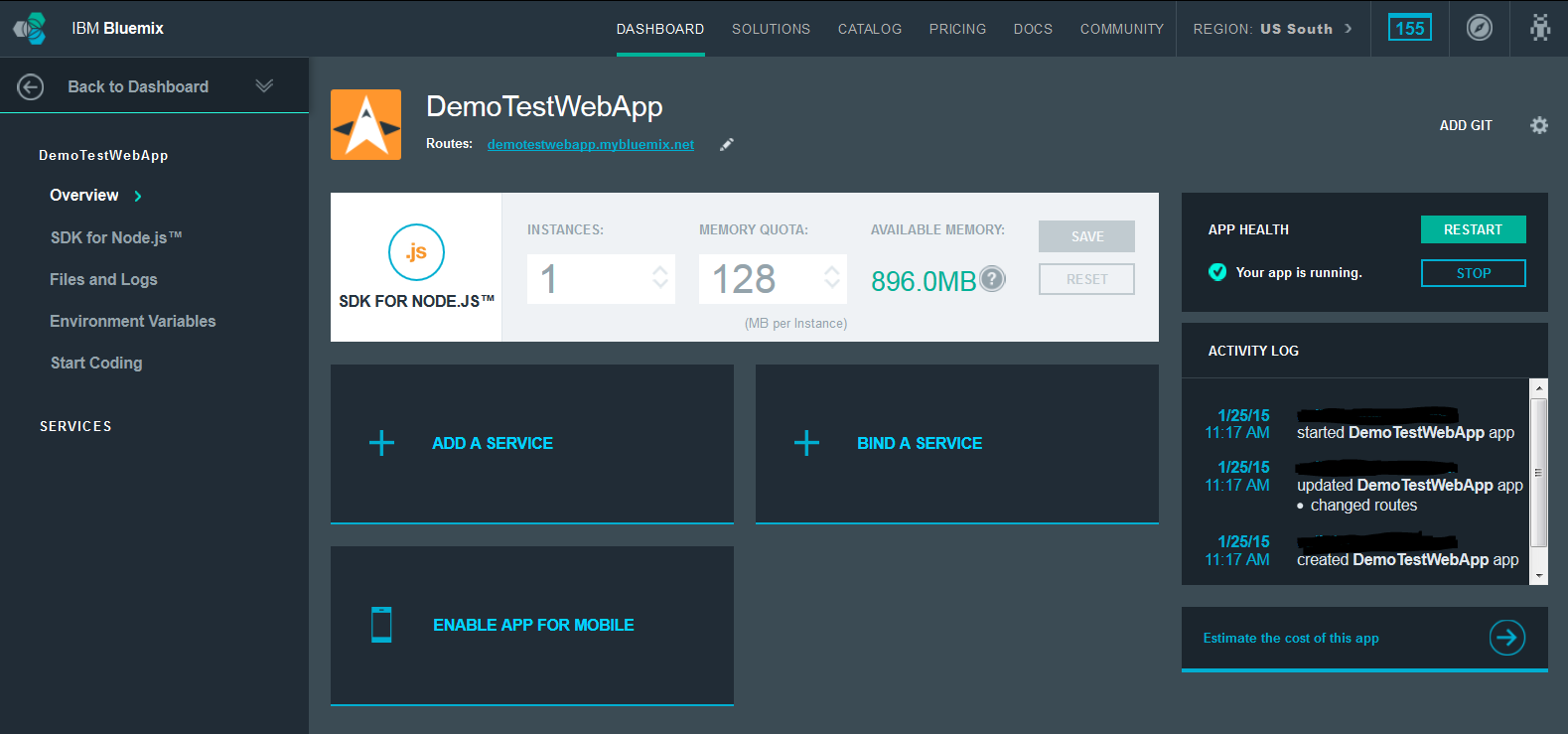
  • Let see how it looks like, shall we?

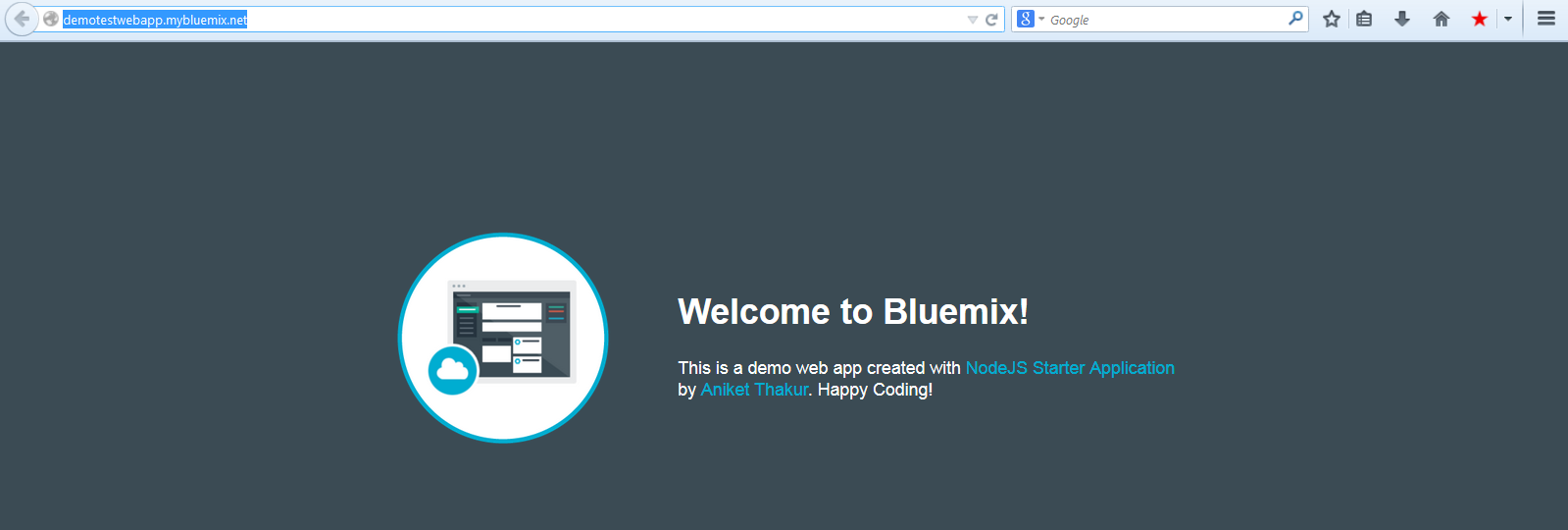
See the Route field in above screenshot? That is unique url that points to your App. Go ahead click on it or copy paste it in the URL of your favorite browser. You should see following -


  •  Yeah we create our template App...big deal? What the fun unless we modify it and give it our flavor :)

Modifying and deploying your own code

If you see start coding section under dashboard you should see various methods in which you can build your code.

  •  Yes it provides seamless integration with GIT. Fell free to try out any/all methods. For this demo I am going to use the CF (Cloud foundry) CLI(command line interface). This section gives you list of exact steps that you need to do for creating a local copy of code, changing it and deploying it. But will  re do them for better understanding -

    • Download and install CF CLI from here. I am using Windows. You can choose installer which suits your requirement.... Debian, Redhat, Mac OS X, Windows etc.
    • To verify that it is correctly installed you can simple type cf -v in your command line and it should print you the version. For me it gives -

      C:\Users\athakur>cf -v
      cf version 6.9.0-620f841-2015-01-20T18:01:40+00:00
    • Next Download the template code. Link to it should be in the same CF CLI section of  Start coding section. Go ahead and download the zip file (DemoTestWebApp.zip in my case) and extract it.
    • Lets make some changes to the code now. Example code makes use of Jade Node template engine. The pages that are rendered are in views folder of extracted folder.
    • I have changed some line of code in body.jade file.  For the changes that I made and how can we deploy these changes see following screenshots - 

body.jade File Content

//- body.jade
//- This file provides the HTML body part.


body
  table
    tr
      td(style= "width:30%;" )
        img(src="/images/newapp-icon.png")
      td
        h1 Welcome to Bluemix!
        p This is a demo web app created with <span class = "blue">NodeJS Starter Application</span> by <span class = "blue">Aniket Thakur</span>. Happy Coding!


Now lets deploy our code -

  • Navigate to App directoru ->  cd C:\Users\athakur\Sources\WebTestAppDemo
  • Next connect to bluemix -> cf api https://api.ng.bluemix.net 
  • Login -> cf login -u yourUserName
  • Setup target -> cf target -o yourOrganization -s yourSpace
  • Finally push your code -> cf push DemoTestWebApp 

Finally you should see something like -


1 of 1 instances running

App started


OK

App DemoTestWebApp was started using this command `node app.js`

Showing health and status for app DemoTestWebApp in org *********** / space at
hakur as *************...
OK

requested state: started
instances: 1/1
usage: 128M x 1 instances
urls: demotestwebapp.mybluemix.net
last uploaded: Sun Jan 25 06:28:12 +0000 2015

     state     since                    cpu    memory          disk
#0   running   2015-01-25 11:59:01 AM   0.0%   18.1M of 128M   35.9M of 1G


This means your code is deployed and your app is restarted. All you have to do now is revisit your App URL and test out the changes.


  Lastly I would say it always fun to try new technologies. So do give this a try. It will surely make your life easier (it terms of app deployment and maintenance ofcourse :) )


Related Links

Understanding SOA (Service Oriented Architecture)

Background


Lets say you are designing a system to process stock rates that you receive from stock exchange. Lets say you develop a web application that expects a JSON object. Maybe in further processing down the workflow some other format is expected. To integrate various such services and inter communicate in platform independent way SOA is used. SOA suites provides easy way to integrate such services.


SOA and ESB

SOA is service oriented architecture. In SOA services are decoupled and can interact with each other irrespective of the service type. Meaning a particular service can be platform or protocol specific but SOA enables such services to interact and exchange data. This data is essentially exchanged via ESB (Enterprise service bus) which forms the backbone of any SOA architecture.

Let me go ahead and give specific example to help understand this better. One way ESB could be implemented us by using JMS servers and using XML/XSD as means of transferring data between various services. So various service will register or connect to these JMS servers and exchange data using XML format. Generally SOA suite comes bundles with so called adapters that help transforming messages to and from format understood by service and XML.

For example consider shares trading system. Messages from stock exchange come in FIX protocol. You may have build an application that expects JSON. To make these both systems work you will use SOA - FIX Adapter will convert FIX message to XML, then this xml will be transferred to JSON Adapter over ESB which will then convert to JSON as required by your system endpoint.

Note : I have mentioned XML as it is platform independent message format. It is in fact SOAP (Simple Object access Protocol) that is used to transfer messages. SOAP is a standardized xml with already defined and recognized specifications.

Finally hoping following picture makes it very clear.


Related Links

t> UA-39527780-1 back to top