Friday, 17 October 2014

Install and use Git on Windows

Background

There are multiple code versioning tools. Some of them are SVN, Git, Mercurial, Perforce etc. In this post we will see how can we install git on windows and use it to create a local repository of a existing repository on github.

For installing git on Linux from source you can refer to one of my earlier posts - 


Installation

  1. Download the installer from the official git website.
  2. Run the installer. 
  3. If you are a beginner leave every setting in the installation workflow to default except probably the screen that says add git to the classath (This would alter your $PATH env variable).
  4. Finally click on finish to complete the intallation.

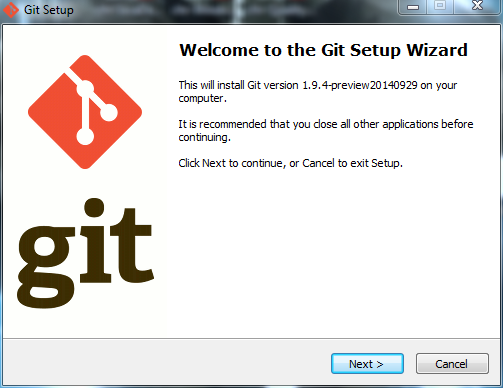
Screenshots for installation


Quick way to know if git is installed in your system is to open your command prompt and type git or git --version


If you see above output you have successfully installed git on your System.


Cloning a Git repository from Github

I have a repository on github that I had created fir creating a simple tic-tac-toe android application some time back. I am going to clone the same one. You can view the project at https://github.com/aniket91/TicTacToe

To clone a repository you have to use git clone repoUrl command. 
  •  C:\Users\athakur\GitSources>git clone https://github.com/aniket91/TicTacToe.git


Pushing changed to Github repository

Prior to pushing your changes you need to be aware of the changes that you have made. For that you can use git status command.

  • git status

Before pushing you need to  commit your changes. Use
  • git commit -a OR
  • git commit -m "git commit message"
to confirm your change. You will be asked to provide commit message. An empty commit message will abort the commit.


If you want to redo your commit then you need to execute - 

  • git reset --soft HEAD~1  
This will reset all your commit.

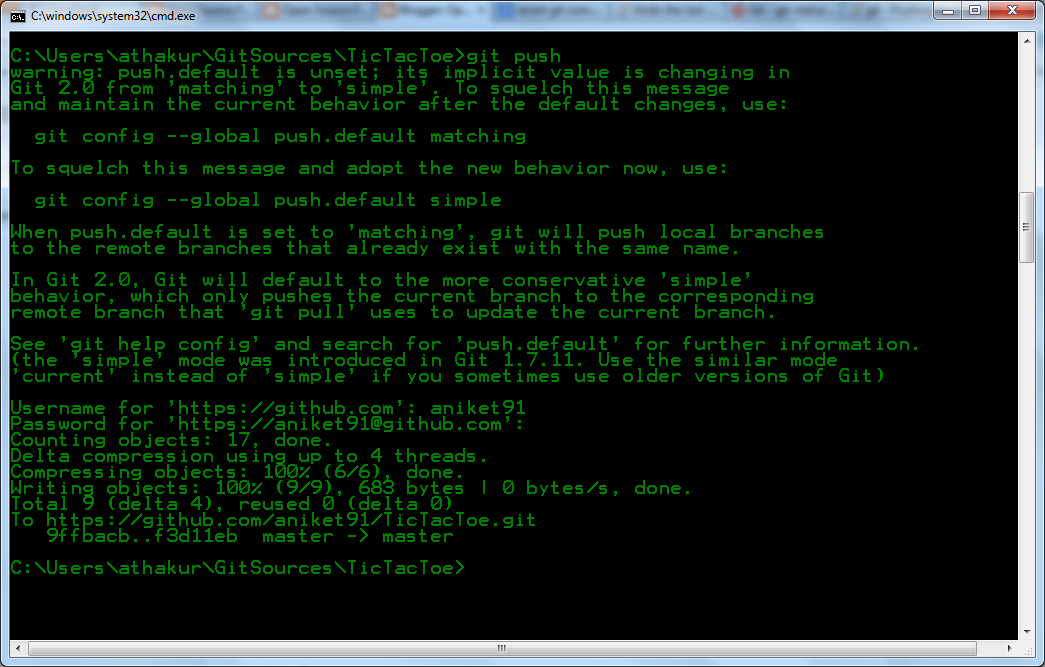
To push your changes you need to execute git push command. 

  • git push


You can see your commit changes on github. Below is the screenshot for my demo changes in this post.


Confused with master, remotes, origin?

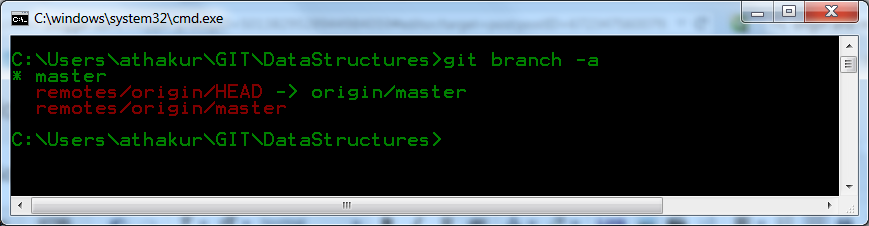
You can run the following command to know more about repos your git knows -
  • git branch -a


Here, master is a branch in the local repository. remotes/origin/master is a branch named master on the remote named origin. remotes/origin/HEAD is the default branch for the remote named origin. This lets you simply say origin instead of origin/master.

So master is the branch name where as origin in the remote repo name.

Avoid Merge Commits

Whenever you have unpushed commits on your local and you try to do a git pull after those commits it will create a merge commit .
To avoid it follow one of the below mentioned methods,

  1. run git pull --rebase 
  2. To avoid running it with the rebase flag and to make the above the default behavior when pulling changes, git config --global branch.autosetuprebase always 
  3. In SourceTree under tools->options/preferences under the Git tab select "Use rebase instead of merge by default for tracked branches"

My Git Repositories


Related Links

Wednesday, 15 October 2014

Installing Google Nexus 5 USB Drivers (for ADB)

Background

In one of the previous posts we had discussed the scenarios in which android device is not detected by Eclipse ADT.

This post is covers same aspect with more depth with Nexus 5 device as an example.

Check

That post will give you very basic idea on how to make your android device recognized by Eclipse ADT/ Android ADB. There are two ways to know if your device is regognized - 

  1. You try to push your android App to the device and notice there is no device listed to push the app to.
  2.  Or simply run 'adb devices' to see if ADB is recognizing your devices.

2nd point can have 3 outcomes -

1. You get no devices :

C:\Users\athakur>adb devices
List of devices attached


This is the case we will discuss today in this post.

2. You see your device but as unauthorized :

C:\Users\athakur>adb devices
List of devices attached
07f4545f00f333c8        unauthorized


In this case you should Enable USB debugging. Connect you machine to device via usb and select authorize  connection from device.
See Can't connect Nexus 4 to adb: unauthorized
After you successfully do so you should get case 3

3.You see your device with ID :

C:\Users\athakur>adb devices
List of devices attached
07f4545f00f333c8        device


In this case you are good to go.

Installing Google Nexus 5 USB Drivers (for ADB)


Though this post is specific to Nexus 5 steps are same for any OEM. You can get the driver from 

Steps :
  1. Install google USB driver from SDK manager (SDK manager is inside your ADT bundle). It should get installed under  <sdk>\extras\google\usb_driver\ .

  2. Connect your android device to your machine. Enable USB debugging. (How to enable developers option in your android device?)
  3. Right click on My computer then select Manage. Then select Device on left panel.In the other devices section you should see your device. Nexus 5 in this case.

  4. Right click on your device entery and select Update Driver Software.

  5. Select Browse my computer for driver software option and select the USB driver folder (<sdk>\extras\google\usb_driver\.)

  6. Install the driver.

To confirm your ADB will now be able to recognize your device repeat check section of this post. You should see point 3 as the outcome (if you get point 2 see the solution in the same point).


If your Eclipse detects the device but does not recognize it you may have to restart adb server -


Related Links

Thursday, 9 October 2014

Garbage collection in Java

Background

Be it any programming language memory management forms a very important aspect. In languages like C++ you need to write the code (destructors) to cleanup the memory used by your application. But in Java the JVM handles the memory cleanup. Programmers don't have to worry about it. In this post we will see how garbage collection is done in Java.


Basics

  1. Heap is the memory space in JVM where Objects are created. Consider following code statement -

    Animal animal = new Dog(); 

    Lets break it down into two statements - declaration and initialization.

    First we declare a reference to Object of type Animal i.e Animal animal;  This simply creates a reference on Stack . This reference can point to an actual Object of type Animal or any of it's subclass (by polymorphism).

    Then we initialize it i.e animal = new Dog();  . So now the reference on the Stack is pointing to an actual object of type Dog that lies in the Heap.

    So to conclude this point Objects are created on heap, references are on Stack and references point to the Objects in Heap.

  2. Heap space is used for dynamic allocation of memory. Meaning when instance of JVM is created a fixed heap space is initialized. As and when Objects are created space from this heap is utilized and similarly freed when Objects are garbage collected.

  3. If ever the Heap gets filled up and there is no more space left JVM will throw java.lang.OutOfMemoryError error and simply shut down. It's what we call a crash.

Garbage Collection

JVM keeps track of live Objects and discards the one those are not. How does JVM figure out and keep track for live Objects. There is various algorithms that JVM use. We will get to it. On a higher level you can think as JVM will remove all the objects that are no longer referenced or reachable by your application code. As we understand Object not reachable by the application code will be garbage collected how do we define what comprises our current application code so that we may figure out set of Objects that are reachable or unreachable.


There are special objects called GC roots that are always reachable by the application code. All objects that can be reached via these roots are alive. Rest can be garbage collected. A simple java application has following GC roots - 

  1. Local variables [kept live from Stack]
  2. Live threads
  3. Static variables


Eligibility for garbage Collection

In last section we said all Objects that are not reachable from GC root are potential candidates for garbage collection. Some of the general cases in which Object will be eligible for GC -

  1. When you explicitly set it's reference to null. If you recollect the first point from basics section setting animal = null; will make the Dog object eligible for GC.
  2. When an Object is created in a method or a block , when program context goes out of that scope (technically speaking that Objects reference went out of the Stack) that object will be eligible for GC.
  3. If an Object is eligible for GC all objects that the parent Object have reference to will be eligible for GC . Unless of course when the child Objects are reference via some other GC root.
NOTE : GC thread is a daemon thread which is run by JVM based on GC algorithm. It may run in parallel to other live application threads or may led to Stop the world event where all application threads are suspended and GC happens (typically happens during full or Major GC when old generation area is full)

How are Cyclic references handled?

So lets says you have Object A that has reference to object B and B has reference to A. So basically both have life references to each other. Will they be GCed? That depends. If any of the Object os reachable from the GC roots they will not be eligible for GC but if they are not reachable both will be eligible for GC. 

In short ,
Cyclic dependencies are not counted as reference so if Object A has reference of Object B and Object B has reference of Object A and they don't have any other live reference then both Objects A and B will be eligible for Garbage collection.

[Take a look Non reachable Objects in the above picture]

Mark-and-Sweep Algorithm

To determine which objects are no longer in use, the JVM intermittently runs what is very aptly called a mark-and-sweep algorithm. It works as follows
  1. The algorithm traverses all object references, starting with the GC roots, and marks every object found as alive.
  2. All of the heap memory that is not occupied by marked objects is reclaimed. It is simply marked as free, essentially swept free of unused objects.
So if any object is not reachable from the GC roots(even if it is self-referenced or cyclic-referenced) it will be subjected to garbage collection.
Ofcourse sometimes this may led to memory leak if programmer forgets to dereference an object.


How Garbage Collection works in the Heap?

To understand this section first you need to understand Java memory model. Heap space is mainly divided into 3 sections - 

  1. Young generation
  2. Tenure or Old generation
  3. Permanent generation

Young generation is further subdivided into -
  1. Eden space
  2. Survivor1 (S1)
  3. Survivor2 (S2)


Here is what happens -

  1. When your Objects are created they are infact created in Young generation (Eden space). 
  2. When Objects are directly garbage collected from Eden space it's termed as Minor GC (does not affect your Java process) .Though this is also a Stop the World event it has very less impact assuming  assuming a high infant mortality rate. Which means most of the newly created objects have very short lifespan and become unreachable early. So very less objects needs to be moved to one of the survivor spaces or old generation.
  3. Also note at a single point of time only one of the survivor space is occupied (other is empty). 
  4. So on each minor GC objects with no live reference from Eden and one of the Survivor spaces are removed. Surviving ones are moved to the empty survivor space and the source survivor space is freed.
  5. Finally when Objects have survived multiple minor GC cycles they will be moved to Tenure or Old generation generation. This will typically be based on age or number of cycles objects are alive in young generation.
  6. When objects in Old generation are subjected to garbage collection we call it Major GC. This is often much slower because it involves all live objects.

Note that all GC (major and minor) are Stop the World Events meaning all currently running java threads will stop running GC will be performed. Since minor GC deals with short lived Objects it is faster and does not affect the process. It is the Major or full GC that affects the process performance. Each programmer should try to minimize number of occurrences of full GC.


Also note permanent generation space is where all the program meta data go - classes , static variables, String pool etc. Objects from perm gen area are garbage collected in full GC.


JVM arguments for controlling Heap Size


Detailed arguments can be checked from oracle website : Java HotSpot VM Options.

Important points

  1. Heap space is allocated when JVM instance is created. Objects are allocated and de -allocated space dynamically. 
  2. Heap is divided into - Young, old and permanent generation.
  3. Objects are created in Eden space of Young gen and subsequently moved to survivor spaces and then old generation.
  4. Permanent generation is space where you store your class metadata, static variables, String pool etc.
  5. We must always aim to reduce frequency of full or major GCs as they affect applications performance.
  6. The young generation consists of eden plus two survivor spaces . Objects are initially allocated in eden. One survivor space is empty at any time, and serves as a destination of the next, copying collection of any live objects in eden and the other survivor space. Objects are copied between survivor spaces in this way until they are old enough to be tenured, or copied to the tenured generation.
  7. There is no way to force garbage collections. But then there are some methods like System.gc () and Runtime.gc (). However these methods simply request JVM to perform GC. JVM may choose to ignore.
  8. Before Object is garbage collected it's finalize ()  method is called (You can see this method in Object class). if you want to perform any cleanup of your own you need to override this method and add your logic

References

Monday, 6 October 2014

Web scrapping using Jsoup Java library

Background

Websites are generally intended to humans to visit and go through it's content but we can very well automate this process. What happens when we hit a URL in the browser ? A GET or a POST request is sent to the server, server authenticates the request (if any) and replies with a response - typically a HTML response. Our browser understands the response and renders it in human readable form. If you know this it is no problem for a programmer to automate a REST API using CURL or HTTPClient , parse the response and fetch the interested data. 


Let me go a few steps ahead. Today we have many libraries in many languages that automate the process of sending requests, parsing the response and getting the data you are really interested in. They are know as Web Scrappers and the technique is know as Web scrapping.


Even see a text image validation or captcha before entering a  website ? Well it's there to ensure you are a human and not some bot (automated scripts like the one we will see in this post). Well then one would ask why do we need this web scrapping ? Heard of Google ? How do you think it shows you so accurate search result based on your search query or rather how does it know that a relevant page exists in first place? Yeah well......... web scrapping. Answering how does it get so accurate results is a bit tricky as it involves ranking algorithms and in depth knowledge of data mining. So lets skip that for now :)


Note

Web scrapping is not strictly ethical! and may be termed as hacking in some scenarios. So please check the legal policies of the website before trying anything like that. My intentions here are purely academic in nature :)

So do go ahead play with new libraries, new APIs, learn new things... but by staying withing the rules.

Web scrapping using Jsoup


So coming back to our title of the POST. we are going to use Jsoup library in Java to scrap web pages. As per their homepage info - 

  • jsoup is a Java library for working with real-world HTML. It provides a very convenient API for extracting and manipulating data, using the best of DOM, CSS, and jquery-like methods.
  • jsoup implements the WHATWG HTML5 specification, and parses HTML to the same DOM as modern browsers do.
    •  scrape and parse HTML from a URL, file, or string
    • find and extract data, using DOM traversal or CSS selectors
    • manipulate the HTML elements, attributes, and text
    • clean user-submitted content against a safe white-list, to prevent XSS attacks
    • output tidy HTML jsoup is designed to deal with all varieties of HTML found in the wild; from pristine and validating, to invalid tag-soup; jsoup will create a sensible parse tree.
  • jsoup is designed to deal with all varieties of HTML found in the wild; from pristine and validating, to invalid tag-soup; jsoup will create a sensible parse tree.

Setup & Goal

Goal :  I am going to scrap my own blog - http://opensourceforgeeks.blogspot.in and then print all the post titles that come up in the 1st page.


Setup :

I am going to use Ivy dependency manager and Eclipse as I do for most of my projects.
I am using jsoup version 1.7.3. You can see the version in the maven repository. So my Ivy file looks something like below  -

<ivy-module version="2.0" xmlns:xsi="http://www.w3.org/2001/XMLSchema-instance"
       xsi:noNamespaceSchemaLocation="http://ant.apache.org/ivy/schemas/ivy.xsd">
    <info
        organisation="OpenSourceForGeeks"
        module="WebScrapper"
        status="integration">
    </info>
    
    <dependencies>
    
        <dependency org="org.jsoup" name="jsoup" rev="1.7.3"/>
        
    </dependencies>
   

</ivy-module>


So go ahead build your project, resolve and add Ivy library. This would download the library and set it in your classpath. Create classes, packages to suit your requirement. My project structure looks like -


Code :

Add the following code in your WebScrapper class -

import java.io.BufferedReader;
import java.io.IOException;
import java.io.InputStreamReader;
import java.net.MalformedURLException;
import java.net.URL;
import java.net.URLConnection;
import java.util.Scanner;

import org.jsoup.Jsoup;
import org.jsoup.nodes.Document;
import org.jsoup.nodes.Element;
import org.jsoup.select.Elements;

/**
 * 
 * @author athakur
 *
 */
public class WebScrapper {
    
    public static void main(String args[]) {
        WebScrapper webScrapper = new WebScrapper();
        String page = webScrapper.getPageData("http://opensourceforgeeks.blogspot.in/" );
        Document doc = Jsoup.parse(page);
        Elements elements = doc.select(".post-title > a");
        for(Element element : elements) {
            System.out.println("POST TITLE : " + element.childNode(0).toString());
        }
    }


    public String getPageData(String targetUrl) {
        URL url = null;
        URLConnection urlConnection = null;
        BufferedReader reader = null;
        String output = "";
       
        try {
            url = new URL(targetUrl);
        }
        catch(MalformedURLException e){
        System.out.println("Target URL is not correct. URL : " + targetUrl);
        return null;
        }
       
        try {
            urlConnection = url.openConnection();
            reader = new BufferedReader(new InputStreamReader(urlConnection.getInputStream()));
            String input = null;
            while((input = reader.readLine()) != null){
                output += input;
            }
            reader.close();
        }
        catch( IOException ioException) {
            System.out.println("IO Exception occurred");
            ioException.printStackTrace();
            return null;
        }
       
        return output;
       
    }

    
}


Go ahead, run the program and check the output.

Output

POST TITLE : What is object-oriented programming? - By Steve Jobs
POST TITLE : Experimenting with Oracle 11g R2 database
POST TITLE : Difference between DML and DDL statements in SQL
POST TITLE : Difference between a stored procedure and user defined function in SQL
POST TITLE : IO in Java (Using Scanner and BufferedReader)

Explanation

If you are aware of HTML/CSS  code is quite self explanatory. All you have to understand is how the select query works. If your HTML element had id="myId" we can refer it as #myId. Same goes for class. if your element had class="myClass" we can refer it as .myClass. Select query work exactly the same way. For more on syntax refer - 

In the select query that I have used I am simply saying parse the page and get me all the elements that are a(anchor tag) and are children of Element with class = "post-title". Display text of the anchor tag is the data we are interested in.

How did I know what class or id to search ? Well we need to do some manual searching. In my case first I parsed the whole page, printed it and searched for the pattern I was interested in. You can do the same by going to a page and inspecting the page source code - via browser.

Related Links


Sunday, 5 October 2014

What is object-oriented programming? - By Steve Jobs

Background

If you know Java or C++ then you are already familiar with what Object oriented programming. It is a simple yet tricky concept to understand. I was browsing through some of the programming questions on Quora and came across this answer about OOP. It is as described by Steve Jobs in an interview. I am not aware of the source for this but I am still going to go ahead and put it down here as it is a very good real life scenario to illustrate what OOP is.


What is object-oriented programming? - By Steve Jobs


Here, in an excerpt from a 1994 Rolling Stone interview, Jobs explains what object-oriented programming is.


Jeff Goodell :  Would you explain, in simple terms, exactly what object-oriented software is?

Steve Jobs : Objects are like people. They’re living, breathing things that have knowledge inside them about how to do things and have memory inside them so they can remember things. And rather than interacting with them at a very low level, you interact with them at a very high level of abstraction, like we’re doing right here.
Here’s an example: If I’m your laundry object, you can give me your dirty clothes and send me a message that says, “Can you get my clothes laundered, please.” I happen to know where the best laundry place in San Francisco is. And I speak English, and I have dollars in my pockets. So I go out and hail a taxicab and tell the driver to take me to this place in San Francisco. I go get your clothes laundered, I jump back in the cab, I get back here. I give you your clean clothes and say, “Here are your clean clothes.”
You have no idea how I did that. You have no knowledge of the laundry place. Maybe you speak French, and you can’t even hail a taxi. You can’t pay for one, you don’t have dollars in your pocket. Yet I knew how to do all of that. And you didn’t have to know any of it. All that complexity was hidden inside of me, and we were able to interact at a very high level of abstraction. That’s what objects are. They encapsulate complexity, and the interfaces to that complexity are high level.


Let me relate the above in a more technical way. There are various things that define each individual - their name, gender, age, country they live in, language etc. This is the structure of "people" and the different values for each parameter define unique individuals. This is nothing but Classes which define how your Objects are in Java. The person asking for laundry and the person carrying out the task are both different Objects. What Jobs meant by saying that the person requesting for laundry is not aware of the complexities involved in carrying out the actual process is actually what is termed as data encapsulation. All that is done here is delegate task to type of Objects that understand the task. If you go a few steps ahead all - the Cab, the Laundry, the laundry man are all Objects. Laundry man Object knows where to get the laundry done but how do we get there ? He will need a Cab Object where he would say take me to  X place. Now the Cab object knows how to drive from place A to place B. So Laundry man does not have to worry about the complexities of getting to laundry place. If you see a broader picture we all in day to day life are all Objects with specific attributes and function and we continuously interact and delegate to work as a System. This System is nothing but the Java program and the ecosystem is nothing but the JVM (Java virtual machine).


Some characteristics that define a OOP design - 

1. Object              -    Instance of Class
2. Class                -    Blue print of Object
3. Encapsulation   -    Protecting our Data
4. Polymorphism  -    Different behaviors at different instances
5. Abstraction      -    Hiding our irrelevant Data
6. Inheritance       -    Object inheriting propertied from it's parent.


Related Links

t> UA-39527780-1 back to top