Friday, 3 October 2014

Basic PL/SQL syntax and query executions on Oracle 11g R2 database

Background

Today has been all about databases. Some posts written earlier today - 

In this post we will write and execute actual SQL code. Lets start from very basics and move onto some advance stuff.

Note : This SQL queries are in fact PL/SQL and will be executed on oracle database 11g R2. I am using sqlfiddle site to test the queries. You can also do so.


Table Creation

Lets first create a database to work on. I am going to create a database named EXPENDITURE with columns as NAME representing the name of person whose expense is and the column AMOUNT which is the amount due for a person.

create table EXPENDITURE (NAME varchar(255), AMOUNT int);


Add Primary key constraint and Insert operation


Now lets go ahead and set constraints of primary key on our table . Primary key is a column of set of columns that uniquely define a row. In our case it will be column NAME. So there cannot be two rows in the table with same entry for NAME. Also lets add some dummy values to our table - 

alter table EXPENDITURE ADD CONSTRAINT PRIMARY_KEY PRIMARY KEY (NAME);
insert into EXPENDITURE values ('JOHN',25);
insert into EXPENDITURE values ('SAM',127);
insert into EXPENDITURE values ('EDWARD',12);
insert into EXPENDITURE values ('PENNY',1024);

Now lets print the values in the database - 

select * from EXPENDITURE;


|   NAME | AMOUNT |
|--------|--------|
|   JOHN |     25 |
|    SAM |    127 |
| EDWARD |     12 |
|  PENNY |   1024 |

Add Secondary key constrain

Eg.
create table schema8.EMPLOYEE(ID int, name varchar2(255));
alter table schema8.EMPLOYEE ADD CONSTRAINT PRIMARY_KEY PRIMARY KEY (ID);
create table schema8.EMPLOYEE_SALARY(EMPLOYEE_ID int, department varchar2(255), salary int);
alter table schema8.EMPLOYEE_SALARY ADD CONSTRAINT FK_EMP_ID FOREIGN KEY (EMPLOYEE_ID) REFERENCES schema8.EMPLOYEE(ID);

Delete operation


Now lets perform a delete for entry with name ='SAM' and and check the table again.

delete from EXPENDITURE where NAME='SAM';


|   NAME | AMOUNT |
|--------|--------|
|   JOHN |     25 |
| EDWARD |     12 |
|  PENNY |   1024 |


Yup entry is deleted. You can also do a truncate which will remove all entries from the table or you can do drop  which will drop the entire table including all the entries in it.


Renaming and modifying column


Now lets rename the column AMOUNT to EXPENSE and modify the column NAME from varchar(255) to varchar(128) and say it can never be null. Finally lets describe the table to see the changes -


ALTER TABLE EXPENDITURE RENAME COLUMN AMOUNT to EXPENSE;

ALTER TABLE EXPENDITURE MODIFY NAME varchar(128) not null;

DESCRIBE EXPENDITURE;


Note : Unfortunately DESCRIBE does not seem to work on JSFiddle. It's because "describe" is not a part of SQL. It is something that Oracle's sqlplus shell implements, not the server. So as an alternative we can do  -

ALTER TABLE EXPENDITURE RENAME COLUMN AMOUNT to EXPENSE;

ALTER TABLE EXPENDITURE MODIFY NAME varchar(128) not null;

select column_name, data_type, data_length, nullable from all_tab_columns where table_name = 'EXPENDITURE';

| COLUMN_NAME | DATA_TYPE | DATA_LENGTH | NULLABLE |
|-------------|-----------|-------------|----------|
|        NAME |  VARCHAR2 |         128 |        N |
|     EXPENSE |    NUMBER |          22 |        Y |


GROUP BY AND ORDER BY statements

select * from EXPENDITURE order by EXPENSE;


|   NAME | EXPENSE |
|--------|---------|
| EDWARD |      12 |
|   JOHN |      25 |
|  PENNY |    1024 |


select * from EXPENDITURE order by EXPENSE DESC;


|   NAME | EXPENSE |
|--------|---------|
|  PENNY |    1024 |
|   JOHN |      25 |
| EDWARD |      12 |


select NAME, max(EXPENSE) from EXPENDITURE group by NAME;


|   NAME | MAX(EXPENSE) |
|--------|--------------|
| EDWARD |           12 |
|   JOHN |           25 |
|  PENNY |         1024 |

Note : Since we have unique names (NAME being the primary key) each group is infact a row. So you would see the same result selecting all rows from a database.

NOTE : You cannot use aggregate functions in where clause.

Counting number of rows in a Table

You can do something like - 

SELECT COUNT(NAME) FROM EXPENDITURE;
| COUNT(NAME) |
|-------------|
|           3 |


Note : Use the primary key in the argument of COUNT() function. As primary key guarantees unique row output of above query will give you total number of rows in the table.

Lets move on to something more advance...

Packages, Procedures and Functions....

Consider following code - 


-- create table

create table EXPENDITURE (NAME varchar(255), AMOUNT int)

//


--add primary key

alter table EXPENDITURE ADD CONSTRAINT PRIMARY_KEY PRIMARY KEY (NAME)

//


-- insert data

insert into EXPENDITURE values ('JOHN',25)

//

insert into EXPENDITURE values ('EDWARD',12)

//

insert into EXPENDITURE values ('PENNY',1024)

//

-- rename column

ALTER TABLE EXPENDITURE RENAME COLUMN AMOUNT to EXPENSE

//

-- change data type

ALTER TABLE EXPENDITURE MODIFY NAME varchar(128) not null

//


-- create package spec

create or replace package PKG_EXPENDITURE

is

    -- define one public procedure

    procedure ADD_EXPENSE(p_name in varchar, p_expense in int);

end;

//


-- create package body

create or replace package body PKG_EXPENDITURE

is

    -- private DOUBLE EXPENSE procedure

    procedure DOUBLE_EXPENSE(p_name in varchar, p_expense in int)

    is

    begin

        insert into EXPENDITURE values (p_name, p_expense);

    end;


    -- private function to return twice the input

    function double(p_number in int)

    return int

    is

    begin

        return 2 * p_number;

    end;


    procedure ADD_EXPENSE(p_name in varchar, p_expense in int)

    is

    begin

        DOUBLE_EXPENSE(p_name, double(p_expense));

    end;


end;

//


and now execute it as -

-- execute the public procedure of the package

begin

    PKG_EXPENDITURE.ADD_EXPENSE('Aniket',111);

end;

//


select * from EXPENDITURE

//


and you should see the output - 

|   NAME | EXPENSE |
|--------|---------|
|   JOHN |      25 |
| EDWARD |      12 |
|  PENNY |    1024 |
| Aniket |     222 |


Explanation - In above code we have first defined a public procedure ADD_EXPENSE. From this procedure we are calling a private procedure DOUBLE_EXPENSE which doubling the expense amount using a private function called double. Finally in DOUBLE_EXPENSE procedure we are simply inserting the value into the EXPENDITURE table. To check the output we are calling this public proc ADD_EXPENSE  and then printing the table.

Note : I have used "//" as a query terminator. You can use ';'. You have a list of options in SQLFiddle.

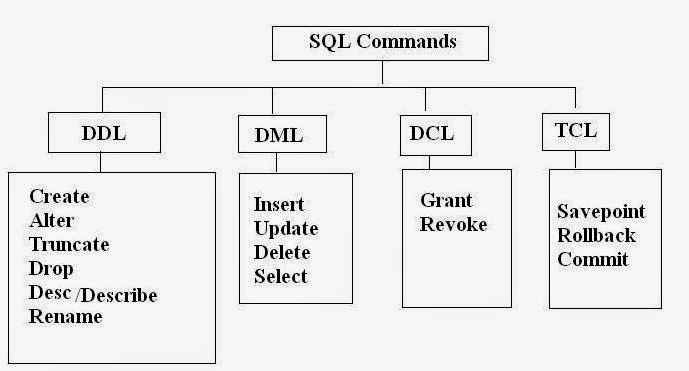

Difference between DML and DDL statements in SQL

Background

SQL as we all know stands for structured Query language. SQL Statements can be categorized as -

  1. DDL (Data definition language)
  2. DML (Data manipulation language) 
  3. DCL (Data Control Language)
  4.  TCL (Transaction Control)

In this post we will see what these statements are and what are the differences between the. This post is written in the context of PL/SQL which is scripting language for oracle DB. So some of the statements may be different or just related to oracle DB.


Definitions

  • DDL (Data definition language): As the name suggests these statements  are used define database structure or schema.

    Example -

    1. CREATE - to create objects in the database
    2. ALTER - alters the structure of the database
    3. DROP - delete objects from the database
    4. TRUNCATE - remove all records from a table, including all spaces allocated for the records are removed
    5. COMMENT - add comments to the data dictionary
    6. RENAME - rename an object.

  • DML (Data manipulation language): These statements are used to change or alter data with the database or schema.

    Example -

    1. SELECT - retrieve data from the a database
    2. INSERT - insert data into a table
    3. UPDATE - updates existing data within a table
    4. DELETE - deletes all records from a table, the space for the records remain
    5. MERGE - UPSERT operation (insert or update)
    6. CALL - call a PL/SQL or Java subprogram
    7. EXPLAIN PLAN - explain access path to data
    8. LOCK TABLE - control concurrency

  • DCL (Data Control Language) : These statements are use to control access or priveledges.

    Example-

    1. GRANT - gives user's access privileges to database
    2. REVOKE - withdraw access privileges given with the GRANT command

  • TCL (Transaction Control) : These statements control transactions like Commit and rollback.

    Example-

    1. COMMIT - save work done
    2. SAVEPOINT - identify a point in a transaction to which you can later roll back
    3. ROLLBACK - restore database to original since the last COMMIT
    4. SET TRANSACTION - Change transaction options like isolation level and what rollback segment to use
     

Differences

  1. As the name and definition suggests DDL statements are for defining the schema or database where as DML statements are of manipulating the database data.
  2. We can use where clause with DML statements but not with DDL statements.
  3. DDL statements are auto commit meaning they cannot be rolled back where as DML statements can be rolled back.
  4. During the execution of DDL command. DDL command would not copy the actual content to rollback tablespace, hence it is fast compared to DML command.


Difference between delete and truncate command ? - Interview Q

This is a very famous database interview question. If you know these commands truncate and delete - both are used to clean the data in the table. 
  • Notice delete is a DML statement where as truncate is a DDL statement. 
  • Hence with truncate you cannot use where clause and rollback is not possible. Delete will remove all row entries which will satisfy the where clause. 
  • Also truncate is faster than delete as no entries are logged into rollback space. 
  • Lastly delete will trigger all the DML triggers associated with delete which will not be the case with truncate.
  • Delete will lock each row for deletion whereas truncate locks the entire table.
Note : drop statement will drop the entire table including all of it's row entries.

Difference between a stored procedure and user defined function in SQL

Background

Whenever we write and run a set of SQL statements together they can be categorized in one of the following - 
  1. Stored procedures
  2. User defined functions

Advantage?

A very common interview question. Why would we write a SQL stored procedure when we can do the same via JDBC calls. The most simple answer is to avoid network traffic. Instead of making multiple JDBC calls we just call the procedure and handle the business logic in it.

Consider a very simple scenario. You have to maintain records of the money other people owe you or the amount you owe to others. So you create a table with lets say column as name  and amoutDue. Every time you make or receive payment you will have to fetch the data, compare it with current payment and then to addition or subtraction accordingly. This will increase your network calls leading to high network traffic. So instead you call a procedure with name and amount (positive or negative) and let the procedure handle the logic. So in procedure we would have logic to select row for the name provided., depending on the amount alter the amount column for the entry. If the amount is o then there is no need to keep the record/row in the table. So delete it.

There are other benefits as well like transaction management and error handling that can be done at stored procedure level but the major benefit is less network traffic. Another use case in centralized maintained . You have to change only the common stored procedure and the business logic will get reflected in all dependent applications.

Difference between Stored procedure and user defined Functions

  1. A function can return only one value which is mandatory where as a stored procedure can have multiple (0 or more) output parameters.
  2. Function can have only input parameters where as a stored procedure can have multiple input/output parameters.
  3. We can use select as well as DML statements (insert/update/delete) in stored procedures but only select statement in a function.
  4. We can call a function from within a procedure but we cannot call a procedure from a function.
  5. We can do Exception handling as well as transaction management in procedures but we cannot do the same in functions.
  6. Functions can be used in SQL statements anywhere in the WHERE/HAVING/SELECT clause where as stored procedures cannot be.
  7. You can directly call a procedure and exec myUser.myPackage.myProc(myArg1,,myArg2). Function you can use it either in a query or call from a procedure.
 Note :  Above are very generic points and may not applicable to the database you use. For example in case of Oracle PL/SQL you have most of the functionality in function that is outlined as not possible in above points.  So refer to the documentation of your database vendor for specific capabilities.

User defined Functions

 Function in a general SQL context can be either - 
  1. System Defined
    1. Scalar Functions (Eg. abs(), round(), upper(), lower() etc.)
    2. Aggregate Functions(Eg. max(), min(), avg(), count() etc.) [generally used in group by clause]
    3. Usage : SELECT *, MyUser.MyScalarFunction() FROM MyTable
  2. User Defined
    1. Scalar Function
      •  Scalar function return single value due to actions perform by the function. 
      • Function can return value of any data type.
      • Usage : SELECT * FROM MyTableFunction()
    2. Inline Table-Valued Function
      •  These type of functions returns a table variable due to actions perform by function. 
      • We can only use a single SELECT statement to return the value.
    3. Multi-Statement Table-Valued Function
      • These type of functions returns a custom declared table variable due to action perform by function. 
      • Here we need to explicitly define the table schema to be returned. We can perform operations on this table to insert/update/delete and then return.
Note : You must have noticed by  now that in above User Defined -> Multi-Statement Table-Valued Function we are using insert, update and delete but in the point mentioned at the top we have said we can only use select statement. I had mentioned this in note immediately after those points and will stress it once again those points are generic one and will vary from vendor to vendor. Above user defined functions are specific to SQL server database.

To see actual SQL queries for procedures and functions in PL/SQL refer -


Related Links

Sunday, 28 September 2014

IO in Java (Using Scanner and BufferedReader)

Background

This is one of the most basic questions in Java. How do we take input and print output in Java. There are multiple ways to do so. Mostly everyone would use Scanner or BufferedReader for input and System.out.println and PrintWriter for output without considering it's use case. Programmers who appear for coding competitions will understand what I am taking about. How do you do IO operations define your efficiency in such competitions and you may end up getting what is known as TLE (Time limit Exceeded). So in this post lets discuss what should we use for IO when and why.


Taking Input in Java

There are two most common ways to take the input - 

  1. Scanner :

    In scanner you can do something like -

    Scanner scanner = new Scanner(System.in, ",");
    String stringInput  = scanner.nextLine();
    int intInput = scanner.nextInt();


    Few points to note here

    • Scanner is used for parsing tokens from underlying Stream. In above case we have given standard output stream (System.in) to the Scanner object. 
    • Scanner also can tokenize your stream based on a delimiter. In above case we have provided comma(',') as a delimiter. Default delimiter is space.
    • As of Java 6 Scanner has a buffer size of 1024 characters.
    • Also Scanner is not synchronized meaning it is not thread safe. So you should not use this when multiple threads are involved.

  2. BufferedReader :

    In case of Buffered Reader you do something like -

    BufferedReader reader = new BufferedReader(new InputStreamReader(System.in));
    String line = null;
    while((line = reader.readLine()) != null) {
         System.out.println("Line read : " + line);
    }


    Few points to note here

    • Buffered Reader simply reads the Stream.
    • As of java 6 BufferedReader has a buffer size of 8192 characters.
    • BufferedReader is synchronized, so read operations on a BufferedReader can safely be done from multiple threads.

Comparing Scanner and BufferedReader

  • Scanner parses the token from underlying Stream where as Buffered Reader simply reads the Stream. In fact you can pass BufferedReader (ReadableSource) to Scanner.

    Scanner scanner = new Scanner(new BufferedReader(new InputStreamReader(System.in)));

  • As mentioned in above points BufferedReader has more buffer size (8192 characters) than Scanner (1024 characters).

  • BufferedReader is faster than Scanner as Scanner parses the token after reading it. So if you notice in coding competitions programmers generally use BufferedReader than Scanner. Only drawback being you have to take care of input formats.

    Infact as per code chef's  IO guidelines -

    Scanner is easily the most convenient way of reading in input, however it is very slow and not recommended unless the input is very small. ( less than 50KB of data is to be read )

    For example if input is an integer you may have to do.

    int data = Integer.parseInt(reader.readLine());
  •  

Why wrap with BufferedReader ?

Generally, each read request made of a Reader like a FileReader causes a corresponding read request to be made to underlying stream. Each invocation of read() or readLine() could cause bytes to be read from the file, converted into characters, and then returned, which can be very inefficient. 

FileReader fileReader = new FileReader(new File("data.txt"));
char[] data = new char[10];

fileReader.read(data); 

Efficiency is improved appreciably if a Reader is warped in a BufferedReader.

FileReader fileReader = new FileReader(new File("data.txt"));

BufferedReader bufferedReader= new BufferedReader(fileReader);

String line = null;

while((line = reader.readLine()) != null) {

    System.out.println("Line read : " + line);

}


Printing output in java

This may not seem to be such a big deal but it infact is. Use PrintWriter than using System.out.println as PrintWriter is faster than the other to print data to the console.

PrintWriter writer = new PrintWriter(System.out,true);
writer.println("Hi there!");

The System.out variable is referencing an object of type PrintStream which wraps a BufferedOutputStream (at least in Oracle JDK 7). When you call one of the printX() or write() methods on PrintStream, it internally flushes the buffer of the underlying BufferedOutputStream.

That doesn't happen with PrintWriter. You have to do it yourself. 

Alternatively, you can create a PrintWriter with an autoFlush property set to true which will flush on each write as I have done in example above.

Some other difference between System.out.println (PrintStream) and PrintWriter

  • PrintStream is a stream of bytes while PrintWriter is a stream of characters.
  • PrintStream uses platform's default encoding while with the PrintWriter you can however pass an OutputStreamWriter with a specific encoding.

    PrintStream stream = new PrintStream(output); 
    PrintWriter writer = new PrintWriter(new OutputStreamWriter(output, "UTF-8"));

  • As mentioned above PrintStream methods internally auto flushes the underlying BufferedOutputStream.
  • Note : autoFlush - A boolean; if true, the println, printf, or format methods will flush the output bufferSo if you do -

    PrintWriter writer = new PrintWriter(System.out,true);        
    writer.write("Hello World!");


    it will not cause auto flush. You will have to call flush explicitly.

    PrintWriter writer = new PrintWriter(System.out,true);
     writer.write("Hello World!");
     writer.flush();
    

Pictorial representation of IO


Related Links

Saturday, 27 September 2014

Apache HttpClient tutorial

Background

Assuming you know what REST or Restful APIs (GET, POST etc) are in this post we will cover how can we make these REST calls with Java program.  As the title of the post suggests the library that we are going to use is  - Apache HttpClient

To test the same REST calls we can use the CURL command line utility. You can learn how to do so from my previous posts on CURL

  1. Download and Install cURL on Windows 
  2. Using HTTP POST and GET using cURL

Dependency

We need to include the Apache HTTP client library in the code. I always use Ivy as a dependency manager for my java programming.

 My Ivy file looks like - 

<ivy-module version="2.0" xmlns:xsi="http://www.w3.org/2001/XMLSchema-instance"
       xsi:noNamespaceSchemaLocation="http://ant.apache.org/ivy/schemas/ivy.xsd">
    <info
        organisation="OpenSourceForGeeks"
        module="Demos"
        status="integration">
    </info>
    
    
    <dependencies>
        <dependency org="org.apache.httpcomponents" name="httpclient" rev="4.3.1"/>        
    </dependencies>
    
</ivy-module>


Note : Whenever you want to add any dependency in any dependency Manager like Maven, Ivy, gradle etc you can search the library in Maven Repository.

Code

import java.io.BufferedReader;
import java.io.IOException;
import java.io.InputStreamReader;
import java.io.UnsupportedEncodingException;
import java.util.ArrayList;
import java.util.List;

import org.apache.http.HttpResponse;
import org.apache.http.NameValuePair;
import org.apache.http.client.ClientProtocolException;
import org.apache.http.client.HttpClient;
import org.apache.http.client.entity.UrlEncodedFormEntity;
import org.apache.http.client.methods.HttpGet;
import org.apache.http.client.methods.HttpPost;
import org.apache.http.impl.client.DefaultHttpClient;
import org.apache.http.message.BasicNameValuePair;


/**
 * 
 * @author athakur
 *
 */
public class HttpClientDemo
{
    
    private static final String USER_AGENT = "Mozilla/5.0";
    private static final int TIMEOUT = 5000;
    
    public static void main(String args[])
    {
        
        HttpClient httpClient = new DefaultHttpClient();
        
        HttpClientDemo httpClientDemo = new HttpClientDemo();
        HttpParams httpParams = httpClient.getParams();
        httpParams.setParameter(CoreConnectionPNames.CONNECTION_TIMEOUT, TIMEOUT);
        httpParams.setParameter(CoreConnectionPNames.SO_TIMEOUT, TIMEOUT);
        
        String getResponse = httpClientDemo.performGetRequest(httpClient, "http://www.google.co.in");
        System.out.println("GET Response : " + getResponse);
        String postResponse = httpClientDemo.performPostRequest(httpClient, "http://www.google.co.in");
        System.out.println("GET Response : " + postResponse);
    }
    

    private String performGetRequest(HttpClient httpClient, String url)
    {
        HttpGet httprequest = new HttpGet(url);
        httprequest.addHeader("User-Agent", USER_AGENT);

        
        try {
            System.out.println("Performing GET request on + " + url);
            HttpResponse httpResponse = httpClient.execute(httprequest);
            System.out.println("Status code : " + httpResponse.getStatusLine().getStatusCode());
            
            BufferedReader reader = new BufferedReader(new InputStreamReader(httpResponse.getEntity().getContent()));

            StringBuffer requestResult = new StringBuffer();
            String line = "";
            while ((line = reader.readLine()) != null) {
                requestResult.append(line);
            }
            
            return requestResult.toString();
      
        }
        catch (IOException e) {
            System.out.println("Exception occurred while performing GET request");
            e.printStackTrace();
            return null;
        }
        finally {
            httprequest.releaseConnection();
        }
    }
    
    private String performPostRequest(HttpClient httpClient, String url)
    {
        HttpPost httprequest = new HttpPost(url);
        httprequest.addHeader("User-Agent", USER_AGENT);
        
        List<NameValuePair> urlPostParameters = new ArrayList<NameValuePair>();
        urlPostParameters.add(new BasicNameValuePair("key", "value"));
     
        try {
            httprequest.setEntity(new UrlEncodedFormEntity(urlPostParameters));
        }
        catch (UnsupportedEncodingException e1) {
            // TODO Auto-generated catch block
            System.out.println("Encoding not supported");
            e1.printStackTrace();
            return null;
        }

        
        try {
            System.out.println("Performing POST request on + " + url);
            HttpResponse httpResponse = httpClient.execute(httprequest);
            System.out.println("Status code : " + httpResponse.getStatusLine().getStatusCode());
            
            BufferedReader reader = new BufferedReader(new InputStreamReader(httpResponse.getEntity().getContent()));

            StringBuffer requestResult = new StringBuffer();
            String line = "";
            while ((line = reader.readLine()) != null) {
                requestResult.append(line);
            }
            
            return requestResult.toString();
      
        }
        catch (IOException e) {
            System.out.println("Exception occurred while performing POST request");
            e.printStackTrace();
            return null;
        }
        finally {
            httprequest.releaseConnection();
        }
    }
    
    
}

Output

Performing GET request on + http://www.google.co.in
Status code : 200
GET Response : <!doctype html><html itemscope="" itemtype="http://schema.org/WebPage" lang="en-IN">...
Performing POST request on + http://www.google.co.in
Status code : 405
GET Response : <!DOCTYPE html><html lang=en>  .......

Note :  POST call will not return valid output (200 status code). We got 405 (method not allowed) for post request because POST is not a valid method type for URL http://www.google.com. It only accepts a GET request.

Setting Timeout

Just for the record - 

HttpParams httpParams = httpClient.getParams();
httpParams.setParameter(CoreConnectionPNames.CONNECTION_TIMEOUT, TIMEOUT);
httpParams.setParameter(CoreConnectionPNames.SO_TIMEOUT, TIMEOUT);


is alternate way to do

HttpParams httpParams = httpClient.getParams();
HttpConnectionParams.setConnectionTimeout(httpParams, TIMEOUT);
HttpConnectionParams.setSoTimeout(httpParams, TIMEOUT);
 
With new APIs introduced in version 4.3 we can do

RequestConfig requestConfig = RequestConfig.custom()
  .setConnectTimeout(TIMEOUT)
  .setConnectionRequestTimeout(TIMEOUT)
  .setSocketTimeout(TIMEOUT).build();
CloseableHttpClient client =
  HttpClientBuilder.create().setDefaultRequestConfig(requestConfig).build();

Understanding Timeouts - 

  • Connection Timeout – Time to establish the connection with the remote host.
  • Socket Timeout  – Time waiting for response of a request – after the connection is established.
  • Connection Manager Timeout  – Time to wait for a connection from the connection manager/pool .

Refer to following diagram to understand how REST APIs work -


Related Links


t> UA-39527780-1 back to top